Loading
Get Ec 20220
How it works
-

Open form follow the instructions
-

Easily sign the form with your finger
-

Send filled & signed form or save
How to fill out the Ec 20220 online
Filling out the Ec 20220 form is an essential step for candidates wishing to report their personal expenses during an election. This guide will provide you with comprehensive, step-by-step instructions to complete the form online efficiently.
Follow the steps to accurately fill out your Candidate's Statement of Personal Expenses
- Click ‘Get Form’ button to access the Ec 20220 form and open it in your preferred online editor.
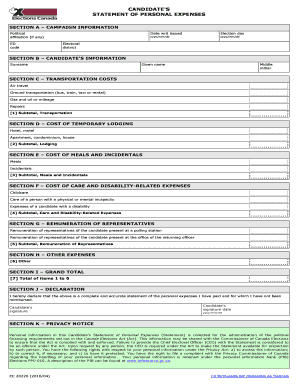
- Section A requires you to provide campaign information, including your political affiliation, ED code, the date the writ was issued, election day, and electoral district.
- In Section B, enter your surname, given name, and middle initial to identify yourself clearly as the candidate.
- Section C is for transportation costs. Include expenses for air travel, ground transportation (such as bus, train, taxi, or rental), gas and oil or mileage, and repairs. Calculate the subtotal for transportation costs.
- For Section D, list the costs of temporary lodging, including expenses for hotels, motels, apartments, condominiums, or houses. Calculate the subtotal for lodging.
- In Section E, document the costs related to meals and incidentals. This section includes individual meal costs and any incidental expenses. Provide the subtotal for meals and incidentals.
- Section F requires you to detail care and disability-related expenses, including childcare, care of a person with a physical or mental incapacity, and expenses of the candidate with a disability. Calculate the subtotal for these expenses.
- In Section G, outline the remuneration of any representatives assisting you during the election, including those present at polling stations and returning officer offices. Provide the subtotal for representative remuneration.
- Section H allows you to include any other relevant expenses not previously covered. Specify these expenses clearly.
- In Section I, calculate the grand total by summing the subtotals from Sections C through H to provide your overall personal expenses.
- Section J contains your declaration statement. Sign and date the form to confirm that your information is complete and accurate.
- After filling out the form, you can save your changes, download a copy for your records, print it, or share it as needed.
Start filling out your Ec 20220 form online to ensure all your personal expenses are accurately reported.