Loading
Form preview
  • US Legal Forms
  • Other Templates
  • More Forms
  • More Multi-State Forms
  • (hra) Indiana Veba Plan Reimbursement Claim Form

Get (hra) Indiana Veba Plan Reimbursement Claim Form

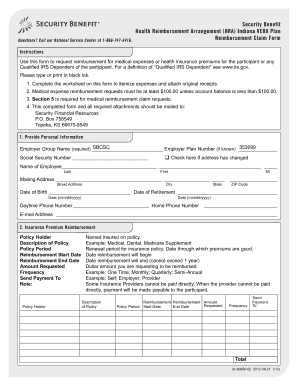
Questions? Call our National Service Center at 18667473416. Security Benefit Health Reimbursement Arrangement (HRA) Indiana VEBA Plan Reimbursement Claim Form Instructions Use this form to request.

How it works

  1. Open form

    Open form follow the instructions

  2. Easily sign form

    Easily sign the form with your finger

  3. Share form

    Send filled & signed form or save

How to fill out the (HRA) Indiana VEBA Plan Reimbursement Claim Form online

This guide provides clear instructions on how to complete the (HRA) Indiana VEBA Plan Reimbursement Claim Form online. By following these steps, users can efficiently request reimbursement for eligible medical expenses or health insurance premiums.

Follow the steps to complete your claim form accurately.

  1. Click ‘Get Form’ button to access the form and open it in your editor.
  2. Provide personal information by filling out the required fields in Section 1. This includes your employer group name, social security number, name, mailing address, and contact information. Ensure that all details are current.
  3. In Section 2, input information about your insurance premium reimbursement. This includes the policy holder's name, description of the policy, reimbursement period, and the amount you are requesting. Double-check that you specify how often you want payments to be sent.
  4. For medical reimbursements, select your preferred method of payment in Section 3. Choose whether to receive funds via direct deposit or check. Fill in the necessary bank details if opting for direct deposit, ensuring all entries are complete to avoid delays.
  5. Section 4 requires your signature. By signing, you confirm that the claim represents qualifying medical expenses and that you are eligible for reimbursement. Review the terms thoroughly before signing.
  6. Finally, summarize your itemized medical bills in Section 5. List the participant or qualified IRS dependent, description of service, date of service, and the amount requested. Ensure all eligible expenses are detailed, and attach any required documentation.
  7. After completing the form, save your changes, download a copy for your records, and then mail it to the provided address or choose to fax it as instructed.

Complete your (HRA) Indiana VEBA Plan Reimbursement Claim Form online today to ensure timely processing of your reimbursement.

Get form

Experience a faster way to fill out and sign forms on the web. Access the most extensive library of templates available.
Get form

Related content

State of Indiana Retirement Medical Benefits...
The State has established this plan as a benefit to retired employees who are eligible for...
Learn more
Chard Snyder: Employee Benefit Solutions Third...
Our mobile app for savings and spending accounts allows employees to view account balances...
Learn more
united states securities and exchange commission...
Mar 10, 2021 — In August 2018, the FASB issued ASU 2018-14, Compensation—Retirement...
Learn more

Related links form

Room Share Agreement Template SBA Loan Authorization And Agreement Template Software Service Level Agreement Template Software Support And Maintenance Agreement Template

Questions & Answers

Get answers to your most pressing questions about US Legal Forms API.

Contact support

A VEBA is a tax-free health reimbursement account which can continue year over year (unlike a Flexible Spending Account). A VEBA can be used by you and your eligible dependents to reimburse for qualified health expenses after your retirement (with the exception of Group Two (UW Police Officers below).

An HRA VEBA is a Health Reimbursement Arrangement where employers place contributions in a trust account on employees' behalf. Unused funds in the account roll over from year to year. Employees can invest a portion of their funds into the market for additional growth outside of their annual election.

If your employer adopts and funds a VEBA account on your behalf, you can begin requesting reimbursement for qualified medical expenses as soon as there is a positive balance in the account.

What is a VEBA? VEBA stands for voluntary employees' beneficiary association and is a tax-exempt trust authorized by Internal Revenue Code Section 501(c)(9). Why should I participate in the Indiana HRA Plan?

Just log in, click Claims, then click Set Up an Automatic Premium Reimbursement. You can also do this from our mobile app, HRAgo®. If you'd rather use a paper form, download and print our Automatic Premium Reimbursement form, or request one from our Customer Care Center.

Get This Form Now!

Use professional pre-built templates to fill in and sign documents online faster. Get access to thousands of forms.
Get form
If you believe that this page should be taken down, please follow our DMCA take down processhere.
Get (HRA) Indiana VEBA Plan Reimbursement Claim Form
Get form
  • Adoption
  • Bankruptcy
  • Contractors
  • Divorce
  • Home Sales
  • Employment
  • Identity Theft
  • Incorporation
  • Landlord Tenant
  • Living Trust
  • Name Change
  • Personal Planning
  • Small Business
  • Wills & Estates
  • Packages A-Z
  • Affidavits
  • Bankruptcy
  • Bill of Sale
  • Corporate - LLC
  • Divorce
  • Employment
  • Identity Theft
  • Internet Technology
  • Landlord Tenant
  • Living Wills
  • Name Change
  • Power of Attorney
  • Real Estate
  • Small Estates
  • Wills
  • All Forms
  • Forms A-Z
  • Other Templates
  • Legal Hub
  • About Us
  • Help Portal
  • Legal Resources
  • Blog
  • Affiliates
  • Contact Us
  • Delete My Account
  • Site Map
  • Industries
  • Forms in Spanish
  • Localized Forms
  • State-specific Forms
  • Forms Kit
  • Real Estate Handbook
  • All Guides
  • Notarize
  • Incorporation services
  • For Consumers
  • For Small Business
  • For Attorneys
  • USLegal
  • FormsPass
  • pdfFiller
  • signNow
  • altaFlow
  • DocHub
  • Instapage
Form Packages
  • Adoption
  • Bankruptcy
  • Contractors
  • Divorce
  • Home Sales
  • Employment
  • Identity Theft
  • Incorporation
  • Landlord Tenant
  • Living Trust
  • Name Change
  • Personal Planning
  • Small Business
  • Wills & Estates
  • Packages A-Z
Form Categories
  • Affidavits
  • Bankruptcy
  • Bill of Sale
  • Corporate - LLC
  • Divorce
  • Employment
  • Identity Theft
  • Internet Technology
  • Landlord Tenant
  • Living Wills
  • Name Change
  • Power of Attorney
  • Real Estate
  • Small Estates
  • Wills
  • All Forms
  • Forms A-Z
  • Other Templates
Customer Service
  • Legal Hub
  • About Us
  • Help Portal
  • Legal Resources
  • Blog
  • Affiliates
  • Contact Us
  • Delete My Account
  • Site Map
  • Industries
  • Forms in Spanish
  • Localized Forms
  • State-specific Forms
  • Forms Kit
Legal Guides
  • Real Estate Handbook
  • All Guides
Prepared for you
  • Notarize
  • Incorporation services
Our Customers
  • For Consumers
  • For Small Business
  • For Attorneys
Our Sites
  • USLegal
  • FormsPass
  • pdfFiller
  • signNow
  • altaFlow
  • DocHub
  • Instapage
Social Media
Call us now toll free:
+1 833 426 79 33
As seen in:
© Copyright 1999-2026 airSlate Legal Forms, Inc. 17 Station Street, Ste. 203, Brookline, MA 02445
  • Your Privacy Choices
  • Terms of Service
  • Privacy Notice
  • Content Takedown Policy
  • Bug Bounty Program