Loading
Form preview
  • US Legal Forms
  • Other Templates
  • More Forms
  • More Multi-State Forms
  • Tricare For Life Eft Enrollment Online

Get Tricare For Life Eft Enrollment Online

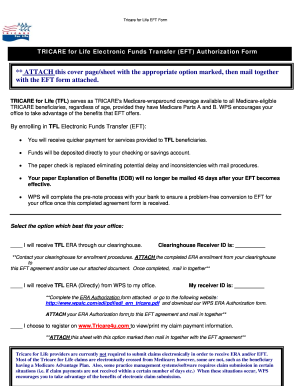
E benefits that EFT offers. By enrolling in TFL Electronic Funds Transfer (EFT): You will receive quicker payment for services provided to TFL beneficiaries. Funds will be deposited directly to your checking or savings account. The paper check is replaced eliminating potential delay and inconsistencies with mail procedures. Your paper Explanation of Benefits (EOB) will no longer be mailed 45 days after your EFT becomes effective. WPS will complete the pre-note proce.

How it works

  1. Open form

    Open form follow the instructions

  2. Easily sign form

    Easily sign the form with your finger

  3. Share form

    Send filled & signed form or save

How to fill out the Tricare For Life EFT Enrollment Online

Enrolling in the Tricare For Life Electronic Funds Transfer (EFT) program is essential for receiving payments quickly and efficiently. This guide will provide you with step-by-step instructions to complete the EFT Enrollment Form online.

Follow the steps to complete your Tricare For Life EFT Enrollment form online.

  1. Press the 'Get Form' button to access the Tricare For Life EFT Enrollment form.
  2. In Part I, indicate whether you are submitting a new EFT authorization, a revision to your existing authorization, or a termination request by marking the appropriate checkbox.
  3. For Part II, enter the provider or supplier information including the name and legal business name. If applicable, provide the chain organization's name and the home office legal business name.
  4. Provide the tax identification number as per IRS regulations. Select whether you want all locations under your Tax ID or specific group NPI and the payment locations for EFT.
  5. In Part III, fill out the depository information section, including the name of your bank, account holder's name, address, and the nine-digit routing number for the account.
  6. Ensure that you select the appropriate type of account (checking or savings) and attach a voided check for verification.
  7. In Part IV, provide the contact person's information, such as their name, telephone number, and email address.
  8. In Part V, sign and date the authorization section, certifying the details provided are accurate and agree to the terms outlined.
  9. Finally, review all information for accuracy before saving changes, downloading, printing, or sharing the completed form.

Complete your Tricare For Life EFT Enrollment form online today for faster payment processing.

Get form

Experience a faster way to fill out and sign forms on the web. Access the most extensive library of templates available.
Get form

Related content

Select Enrollment Fees | TRICARE
17-Feb-2021 — A survivor of an active duty sponsor or medically retired retiree. Do you...
Learn more
TRICARE SUPPLEMENT INSURANCE PLAN Frequently ...
WHO IS ELIGIBLE FOR ENROLLMENT IN THE TRICARE SUPPLEMENT PLAN? Eligibility in the TRICARE...
Learn more
Epayments User Manual R1118 - UserManual.wiki
EFT Matched/Not Posted ERAs > 30 days Bulletin . ... enroll payers in this new, electronic...
Learn more

Related links form

Reverse Factoring Agreement Template Retail Agreement Template Scottish Private Residential Tenancy Agreement Template Software As A Service License Agreement Template

Questions & Answers

Get answers to your most pressing questions about US Legal Forms API.

Contact support

Join the TRICARE East network If you have not already registered your location(s) for electronic claims, please complete the EDI Express Enrollment process.

Call (800) 444-5445.

Medical Claims Fill out the TRICARE Claim Form. Download the Patient's Request for Medical Payment (DD Form 2642). ... Include a Copy of the Provider's Bill. Attach a readable copy of the provider's bill to the claim form, making sure it contains the following: ... Submit the Claim. ... Check the Status of Your Claims.

Providers submitting claims through electronic data interchange (EDI) can submit TRICARE secondary claims in the HIPAA-compliant 837 professional format. Submitting other health insurance claims through EDI will eliminate the need to send an Explanation of Benefits from the primary insurance.

If you are a non-Medicare certified provider, you can continue to submit your claims electronically through our online Internet claim entry application when logged into your account at .tricare4u.com. Electronic Funds Transfer (EFT) is also available for TRICARE For Life.

Providers submitting claims through electronic data interchange (EDI) can submit TRICARE secondary claims in the HIPAA-compliant 837 professional format. Submitting other health insurance claims through EDI will eliminate the need to send an Explanation of Benefits from the primary insurance.

Electronic Claims Submission TRICARE network providers must file 100 percent of their TRICARE claims electronically. * We encourage non-network providers to take advantage of this feature as well. Save time and money. Electronic claims are faster than paper claims, so you get paid faster.

The TRICARE East Region payer ID is TREST.

Get This Form Now!

Use professional pre-built templates to fill in and sign documents online faster. Get access to thousands of forms.
Get form
If you believe that this page should be taken down, please follow our DMCA take down processhere.
Get Tricare For Life Eft Enrollment Online
Get form
  • Adoption
  • Bankruptcy
  • Contractors
  • Divorce
  • Home Sales
  • Employment
  • Identity Theft
  • Incorporation
  • Landlord Tenant
  • Living Trust
  • Name Change
  • Personal Planning
  • Small Business
  • Wills & Estates
  • Packages A-Z
  • Affidavits
  • Bankruptcy
  • Bill of Sale
  • Corporate - LLC
  • Divorce
  • Employment
  • Identity Theft
  • Internet Technology
  • Landlord Tenant
  • Living Wills
  • Name Change
  • Power of Attorney
  • Real Estate
  • Small Estates
  • Wills
  • All Forms
  • Forms A-Z
  • Other Templates
  • Legal Hub
  • About Us
  • Help Portal
  • Legal Resources
  • Blog
  • Affiliates
  • Contact Us
  • Delete My Account
  • Site Map
  • Industries
  • Forms in Spanish
  • Localized Forms
  • State-specific Forms
  • Forms Kit
  • Real Estate Handbook
  • All Guides
  • Notarize
  • Incorporation services
  • For Consumers
  • For Small Business
  • For Attorneys
  • USLegal
  • FormsPass
  • pdfFiller
  • signNow
  • altaFlow
  • DocHub
  • Instapage
Form Packages
  • Adoption
  • Bankruptcy
  • Contractors
  • Divorce
  • Home Sales
  • Employment
  • Identity Theft
  • Incorporation
  • Landlord Tenant
  • Living Trust
  • Name Change
  • Personal Planning
  • Small Business
  • Wills & Estates
  • Packages A-Z
Form Categories
  • Affidavits
  • Bankruptcy
  • Bill of Sale
  • Corporate - LLC
  • Divorce
  • Employment
  • Identity Theft
  • Internet Technology
  • Landlord Tenant
  • Living Wills
  • Name Change
  • Power of Attorney
  • Real Estate
  • Small Estates
  • Wills
  • All Forms
  • Forms A-Z
  • Other Templates
Customer Service
  • Legal Hub
  • About Us
  • Help Portal
  • Legal Resources
  • Blog
  • Affiliates
  • Contact Us
  • Delete My Account
  • Site Map
  • Industries
  • Forms in Spanish
  • Localized Forms
  • State-specific Forms
  • Forms Kit
Legal Guides
  • Real Estate Handbook
  • All Guides
Prepared for you
  • Notarize
  • Incorporation services
Our Customers
  • For Consumers
  • For Small Business
  • For Attorneys
Our Sites
  • USLegal
  • FormsPass
  • pdfFiller
  • signNow
  • altaFlow
  • DocHub
  • Instapage
Social Media
Call us now toll free:
+1 833 426 79 33
As seen in:
© Copyright 1999-2026 airSlate Legal Forms, Inc. 17 Station Street, Ste. 203, Brookline, MA 02445
  • Your Privacy Choices
  • Terms of Service
  • Privacy Notice
  • Content Takedown Policy
  • Bug Bounty Program