Loading
Form preview
  • US Legal Forms
  • Form Library
  • Miscellaneous Forms
  • Multi-State Miscellaneous Forms
  • Express Scripts New Prescription Fax Form

Get Express Scripts New Prescription Fax Form

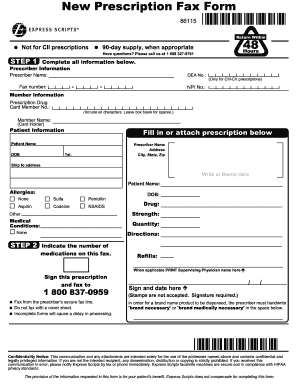
Information below. Prescriber Information Prescriber Name: DEA No.: - Fax number: - (Only for CIII-CV prescriptions) NPI No.: Member Information Prescription Drug Card Member No.: (Include all characters. Leave box blank for spaces.) Member Name: (Card Holder) Patient Information Fill in or attach prescription below Patient Name DOB Prescriber Name Address City, State, Zip Tel. Ship to address Write or Stamp Here Patient Name: Allergies: None Sulfa Aspirin Codeine.

How it works

  1. Open form

    Open form follow the instructions

  2. Easily sign form

    Easily sign the form with your finger

  3. Share form

    Send filled & signed form or save

How to fill out the Express Scripts New Prescription Fax Form online

Filling out the Express Scripts New Prescription Fax Form is an essential step in ensuring your prescription is processed efficiently. This guide provides clear and detailed steps to help you complete the form online, making the process smooth and straightforward.

Follow the steps to successfully complete the form.

  1. Press the ‘Get Form’ button to access the document and open it in your editor.
  2. Begin by completing all required information in the prescriber information section, including the prescriber name, DEA number, and fax number. Ensure you include the NPI number as well, as this is crucial for processing.
  3. Next, input the member information. This includes the prescription drug card member number, making sure to include all characters and leaving boxes blank for spaces. Also, fill in the cardholder's name.
  4. Proceed to enter patient information, which includes the patient’s name and date of birth (DOB). You will also need to fill in or attach the prescription details.
  5. Complete the prescription details by indicating the medication name, strength, and any medical conditions that apply. If applicable, mention any allergies, and specify a quantity.
  6. Indicate any specific directions for the medication, as well as the number of refills requested.
  7. If required, print the supervising physician's name in the designated area. Ensure the prescription is signed and dated by the prescriber, as stamps are not accepted.
  8. Finally, fax the completed form from your secure fax line to 1-800-837-0959. Remember to fax without a cover sheet and ensure all sections are filled out, as incomplete forms can result in processing delays.
  9. Once you've reviewed the document for accuracy, you can save your changes. You may also choose to download the completed form, print it for your records, or share it with others as needed.

Take the next step and complete your documents online for a hassle-free experience.

Get form

Experience a faster way to fill out and sign forms on the web. Access the most extensive library of templates available.
Get form

Related content

Express Scripts Home Delivery Order Form
Fax: Have your doctor call 888.327.9791 for faxing instructions. (Faxes can only be...
Learn more
Fax this page ONLY to
Jun 11, 2014 — The printed fax confirmation is proof of receipt. Most patients can...
Learn more
provider manual
Fill out drug PA form completely; make sure you note your office phone and fax number with...
Learn more

Related links form

Ucw Refund Policy 2020 Tres Palabras Magicas Pdf 2020 4 5 Practice Analyzing Graphs Of Polynomial Functions 2020 Application To Amalgamate, Amend Or Subdivide A Water Licence. This Form Is Used For One Or More Of 2020

Questions & Answers

Get answers to your most pressing questions about US Legal Forms API.

Contact support

Yes, you can fax a prescription to Express Scripts. Utilizing the Express Scripts New Prescription Fax Form, simply complete the document with the required information and send it to the designated fax number. This method guarantees that your prescription is received and processed in a timely manner, making it convenient for you.

To speak with an Express Scripts prior authorization provider, you can call their customer service line, which is available on the Express Scripts website. By contacting them, you can clarify any doubts regarding the prior authorization process and obtain more details about the Express Scripts New Prescription Fax Form as well.

The fax number for submitting the Express Scripts prior authorization form varies based on the medication and the prescription plan. It is best to check the specific form or your plan documents for the correct number. You can also find this information on the Express Scripts website, ensuring that your submission reaches the right department promptly.

Filling out a prescription with Express Scripts is straightforward. Begin by obtaining the Express Scripts New Prescription Fax Form, which guides you through the required sections. Make sure to include patient information, physician details, and medication specifics. Once completed, you can submit the form according to the provided instructions.

To fax documents to Express Scripts, start by preparing the required paperwork and completing the Express Scripts New Prescription Fax Form. Ensure that you have the correct fax number and use a reliable fax machine or online service to complete the sending process. Always keep a record of your fax transmission for your own reference.

Finding the fax number for Express Scripts medical records is vital for proper document handling. As fax numbers may vary, it's recommended to check directly on the Express Scripts website or call their support line. This information is often outlined on the Express Scripts New Prescription Fax Form as well.

To submit to Express Scripts, you can use their online portal or submit via fax. If you prefer fax, fill out the Express Scripts New Prescription Fax Form and send it to the appropriate fax number provided for your submission type. Always ensure that all information is complete and accurate for a smooth submission process.

The specific fax number for Express Scripts Medicare reviews can change. For accurate and up-to-date information, visit the Express Scripts website or contact their customer service. Including the correct fax number on your Express Scripts New Prescription Fax Form is crucial to ensure efficient processing of your reviews.

Faxing a prescription involves several simple steps. Start by gathering the prescription details and complete the Express Scripts New Prescription Fax Form. Once you have this filled out, enter the fax number correctly and send it through a reliable fax service, ensuring you get a transmission report for confirmation.

Yes, you can fax your prescription to Express Scripts, provided you have the right forms and the appropriate fax number. Using the Express Scripts New Prescription Fax Form makes the process easier and helps ensure all necessary information is included. After sending, it is good practice to verify that your prescription has been received.

Get This Form Now!

Use professional pre-built templates to fill in and sign documents online faster. Get access to thousands of forms.
Get form
If you believe that this page should be taken down, please follow our DMCA take down processhere.
Get Express Scripts New Prescription Fax Form
Get form
  • Adoption
  • Bankruptcy
  • Contractors
  • Divorce
  • Home Sales
  • Employment
  • Identity Theft
  • Incorporation
  • Landlord Tenant
  • Living Trust
  • Name Change
  • Personal Planning
  • Small Business
  • Wills & Estates
  • Packages A-Z
  • Affidavits
  • Bankruptcy
  • Bill of Sale
  • Corporate - LLC
  • Divorce
  • Employment
  • Identity Theft
  • Internet Technology
  • Landlord Tenant
  • Living Wills
  • Name Change
  • Power of Attorney
  • Real Estate
  • Small Estates
  • Wills
  • All Forms
  • Forms A-Z
  • Form Library
  • Legal Hub
  • About Us
  • Help Portal
  • Legal Resources
  • Blog
  • Affiliates
  • Contact Us
  • Delete My Account
  • Site Map
  • Industries
  • Forms in Spanish
  • Localized Forms
  • State-specific Forms
  • Forms Kit
  • Real Estate Handbook
  • All Guides
  • Notarize
  • Incorporation services
  • For Consumers
  • For Small Business
  • For Attorneys
  • USLegal
  • FormsPass
  • pdfFiller
  • signNow
  • altaFlow
  • DocHub
  • Instapage
Form Packages
  • Adoption
  • Bankruptcy
  • Contractors
  • Divorce
  • Home Sales
  • Employment
  • Identity Theft
  • Incorporation
  • Landlord Tenant
  • Living Trust
  • Name Change
  • Personal Planning
  • Small Business
  • Wills & Estates
  • Packages A-Z
Form Categories
  • Affidavits
  • Bankruptcy
  • Bill of Sale
  • Corporate - LLC
  • Divorce
  • Employment
  • Identity Theft
  • Internet Technology
  • Landlord Tenant
  • Living Wills
  • Name Change
  • Power of Attorney
  • Real Estate
  • Small Estates
  • Wills
  • All Forms
  • Forms A-Z
  • Form Library
Customer Service
  • Legal Hub
  • About Us
  • Help Portal
  • Legal Resources
  • Blog
  • Affiliates
  • Contact Us
  • Delete My Account
  • Site Map
  • Industries
  • Forms in Spanish
  • Localized Forms
  • State-specific Forms
  • Forms Kit
Legal Guides
  • Real Estate Handbook
  • All Guides
Prepared for you
  • Notarize
  • Incorporation services
Our Customers
  • For Consumers
  • For Small Business
  • For Attorneys
Our Sites
  • USLegal
  • FormsPass
  • pdfFiller
  • signNow
  • altaFlow
  • DocHub
  • Instapage
Social Media
Call us now toll free:
+1 833 426 79 33
As seen in:
© Copyright 1999-2026 airSlate Legal Forms, Inc. 17 Station Street, Suite 303, Brookline, MA 02445
  • Your Privacy Choices
  • Terms of Service
  • Privacy Notice
  • Content Takedown Policy
  • Bug Bounty Program