Loading
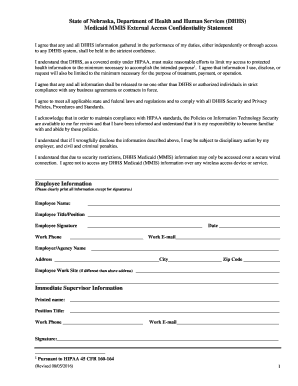
Get Dhhs Medicaid Mmis External Access Confidentiality Statement
How it works
-

Open form follow the instructions
-

Easily sign the form with your finger
-

Send filled & signed form or save
How to fill out the DHHS Medicaid MMIS External Access Confidentiality Statement online
This guide provides you with clear and comprehensive instructions on how to complete the DHHS Medicaid MMIS External Access Confidentiality Statement online. It is designed to ensure that you understand each component of the form to maintain compliance with necessary confidentiality protocols.
Follow the steps to accurately fill out the confidentiality statement.
- Click the ‘Get Form’ button to access the confidentiality statement form and open it for editing.
- Begin filling out the Employee Information section. Clearly print your name, title/position, work phone, and work email address in the designated fields. Ensure the information is accurate and legible.
- Next, complete the Employer/Agency Name section along with the address, city, and zip code fields. If your work site differs from this address, provide that information in the space provided.
- Proceed to the Immediate Supervisor Information section. Print your supervisor's name, position title, work phone, and work email address. Obtain their signature in the designated area to confirm their knowledge of your confidentiality commitment.
- In the Contact Person Information section, provide the name, phone number, and email address of the designated contact person as detailed in the Confidentiality Agreement.
- Indicate your request for external access by specifying the Group NPI number(s) you need. If you are renewing an existing external user ID, select 'Yes' and provide the user ID number. If you are replacing existing staff or have a new position, provide the necessary details as required.
- Finally, review the entire form for accuracy. After confirming that all fields are filled out correctly, save the changes, download, or print the completed document for your records.
Complete your DHHS Medicaid MMIS External Access Confidentiality Statement online today to ensure you maintain compliance and confidentiality.
Phone lines are open from 8:00 a.m. to 5:00 p.m. Monday through Friday. (855) 632-7633. In Lincoln: (402) 473-7000. In Omaha: (402) 595-1178.