Loading
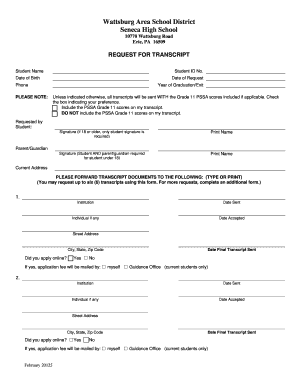
Get Request For Transcript Bformb - Wattsburg Area School District
How it works
-

Open form follow the instructions
-

Easily sign the form with your finger
-

Send filled & signed form or save
How to fill out the Request For Transcript Form - Wattsburg Area School District online
Filling out the Request For Transcript Form for the Wattsburg Area School District is a straightforward process that allows users to obtain their academic transcripts. This guide provides step-by-step instructions to ensure that the form is completed correctly and efficiently, facilitating a smooth transcript request experience.
Follow the steps to complete your request for transcript form online.
- Click ‘Get Form’ button to access the transcript request form and open it for editing.
- In the 'Student Name' field, enter the full name of the student whose transcript is being requested.
- Fill in the 'Student ID No.' field with the unique identifier assigned to the student.
- Provide the 'Date of Birth' of the student in the specified format.
- Enter the 'Date of Request' — the date you are completing the form.
- Input a contact 'Phone' number where you can be reached for any questions regarding the request.
- State the 'Year of Graduation/Exit' for the student.
- Select your preference regarding the inclusion of Grade 11 PSSA scores by checking the appropriate box: 'Include' or 'Do NOT include'.
- In the 'Requested by' section, sign the form — if the student is 18 or older, only the student’s signature is required. Otherwise, signatures from both the student and a parent/guardian are needed.
- Print the name of the person signing the form below the signature.
- Fill in the 'Current Address' where you receive mail.
- In the section labeled 'PLEASE FORWARD TRANSCRIPT DOCUMENTS TO THE FOLLOWING', enter the details for up to six institutions, including name, address, and any specific individual or department at the institution.
- Indicate if you applied online for each institution by selecting 'Yes' or 'No' and specify who will handle the application fee.
- Once all sections are completed, review the form for accuracy. Save your changes, and then proceed to download, print, or share the completed form.
Complete your request for transcript form online today!
Contact the school or District Office. Each district maintains and follows a records retention policy. They may offer a copy of a Diploma but are not required. If the school is closed, records go to the current High School in that District.