Loading
Get Jdf 116 Verified Complaint In Replevin.doc
How it works
-

Open form follow the instructions
-

Easily sign the form with your finger
-

Send filled & signed form or save
How to fill out the JDF 116 Verified Complaint In Replevin.doc online
This guide provides clear, step-by-step instructions for filling out the JDF 116 Verified Complaint In Replevin document online. Whether you have legal experience or not, this comprehensive resource will help you navigate each section effectively.
Follow the steps to accurately complete your complaint.
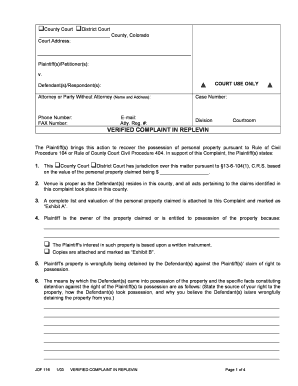
- To begin, click the ‘Get Form’ button to obtain the JDF 116 Verified Complaint In Replevin document and open it in the online editor.
- In the section labeled 'Plaintiff(s)/Petitioner(s):', provide your full name or the name of the organization initiating the complaint.
- In the 'Defendant(s)/Respondent(s):' section, enter the name of the party against whom you are filing the complaint.
- Fill in the 'Attorney or Party Without Attorney' field with the name and address of your attorney, or if you are representing yourself, include your own details.
- Complete the 'Case Number' section if you have an existing case; if not, you can leave this section blank for now.
- In 'Phone Number' and 'FAX Number' sections, list your contact numbers to ensure the court can reach you.
- Specify the 'Division' and 'Courtroom' if applicable; these may be determined by the court where you file your complaint.
- In the body of the complaint, provide a brief description showing the jurisdiction of the court and the venue where the case is filed.
- Attach a complete list and valuation of the personal property claimed as 'Exhibit A.' Reference this exhibit in the complaint.
- Detail your ownership or right to possession of the property, including any supporting written instruments as 'Exhibit B.'
- Explain how the defendant came into possession of the property and the specifics of their wrongful detention.
- Provide the addresses for both the defendant’s residence and business, ensuring accuracy for legal notification.
- Indicate where the property is currently located, if known, to help the court understand the situation.
- State any demands you have made to the defendant for the return of the property.
- Complete the necessary sections about previous assessment or seizure of the property to confirm its status.
- In the concluding section, clearly outline the relief you are requesting from the court.
- Once finished, add your signature, date it, and include your contact information as required.
- Finally, save your changes, and you can choose to download, print, or share the completed form.
Take action today by completing your JDF 116 Verified Complaint In Replevin online.
A Replevin case is a court action in which one person (the Plaintiff) seeks to recover possession of personal property wrongfully taken or detained by another (the Defendant), plus money damages (if any) for the Defendant's unlawful possession of the property.