Loading
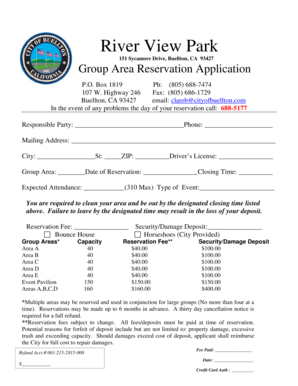
Get River View Park Reservation Application - Buellton
How it works
-

Open form follow the instructions
-

Easily sign the form with your finger
-

Send filled & signed form or save
How to fill out the River View Park Reservation Application - Buellton online
This guide provides a comprehensive approach to completing the River View Park Reservation Application - Buellton online. The aim is to assist users in seamlessly filling out the necessary information and ensuring a successful reservation process.
Follow the steps to complete your reservation application online.
- Click ‘Get Form’ button to obtain the form and access it in your preferred editing tool.
- In the first section of the form, enter the name of the responsible party and their phone number. Ensure that the contact number is valid and accessible as it may be used for communication regarding the reservation.
- Provide the mailing address, including the city, state, and ZIP code. This information is important for correspondence related to your reservation.
- Enter the driver's license number in the designated field. This may be required for identification purposes.
- Select the group area you wish to reserve from the provided options (Areas A, B, C, D, E, or Event Pavilion) and specify the date of your reservation in the appropriate field.
- Indicate the closing time of your reservation. Ensure that you are aware of the park's rules regarding clean-up and departure by the designated closing time.
- Estimate the expected attendance, noting the maximum capacity limit is 310 individuals. This number must not exceed the limit to ensure compliance with park rules.
- Select the type of event you are hosting. This information may be used to evaluate the suitability of your reservation.
- Fill out the reservations fees and damage deposit sections accurately. Make sure to be aware of the associated fees for your chosen group area.
- Review the park rules and regulations section carefully. Acknowledge your understanding by signing and dating the form. Your signature indicates commitment to follow the rules set forth by the park.
- Once all sections of the form are filled out, save your changes. You can then download, print, or share the form as required.
Begin completing your River View Park Reservation Application online now.
Industry-leading security and compliance
US Legal Forms protects your data by complying with industry-specific security standards.
-
In businnes since 199725+ years providing professional legal documents.
-
Accredited businessGuarantees that a business meets BBB accreditation standards in the US and Canada.
-
Secured by BraintreeValidated Level 1 PCI DSS compliant payment gateway that accepts most major credit and debit card brands from across the globe.