Loading
Form preview
  • US Legal Forms
  • Other Templates
  • More Forms
  • More Multi-State Forms
  • Fillable Dc Medical Eye Report

Get Fillable Dc Medical Eye Report

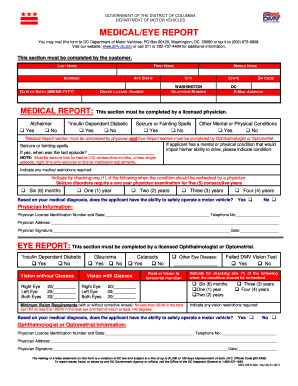
GOVERNMENT OF THE DISTRICT OF COLUMBIA DEPARTMENT OF MOTOR VEHICLES MEDICAL/EYE REPORT You may mail this form to DC Department of Motor Vehicles, PO Box 90120, Washington, DC 20090 or fax it to (202).

How it works

  1. Open form

    Open form follow the instructions

  2. Easily sign form

    Easily sign the form with your finger

  3. Share form

    Send filled & signed form or save

How to fill out and sign Fillable Dc Medical Eye Report online?

Get your online template and fill it in using progressive features. Enjoy smart fillable fields and interactivity.Follow the simple instructions below:

Feel all the benefits of submitting and completing legal forms online. With our service filling in Fillable Dc Medical Eye Report usually takes a few minutes. We make that possible through giving you access to our full-fledged editor capable of altering/fixing a document?s original textual content, adding unique fields, and e-signing.

Execute Fillable Dc Medical Eye Report within a couple of minutes by using the instructions below:

  1. Find the template you will need from the collection of legal forms.
  2. Click on the Get form key to open it and start editing.
  3. Fill in all of the requested boxes (they will be marked in yellow).
  4. The Signature Wizard will enable you to put your e-autograph as soon as you?ve finished imputing details.
  5. Put the relevant date.
  6. Double-check the entire document to ensure you have filled out all the data and no changes are needed.
  7. Press Done and save the ecompleted form to the gadget.

Send the new Fillable Dc Medical Eye Report in a digital form as soon as you are done with filling it out. Your information is securely protected, as we adhere to the latest security criteria. Become one of numerous happy clients who are already filling out legal templates straight from their houses.

Tips on how to fill out, edit and sign Fillable Dc Medical Eye Report online

How to fill out and sign Fillable Dc Medical Eye Report online?

Get your online template and fill it in using progressive features. Enjoy smart fillable fields and interactivity.Follow the simple instructions below:

Feel all the benefits of submitting and completing legal forms online. With our service filling in Fillable Dc Medical Eye Report usually takes a few minutes. We make that possible through giving you access to our full-fledged editor capable of altering/fixing a document?s original textual content, adding unique fields, and e-signing.

Execute Fillable Dc Medical Eye Report within a couple of minutes by using the instructions below:

  1. Find the template you will need from the collection of legal forms.
  2. Click on the Get form key to open it and start editing.
  3. Fill in all of the requested boxes (they will be marked in yellow).
  4. The Signature Wizard will enable you to put your e-autograph as soon as you?ve finished imputing details.
  5. Put the relevant date.
  6. Double-check the entire document to ensure you have filled out all the data and no changes are needed.
  7. Press Done and save the ecompleted form to the gadget.

Send the new Fillable Dc Medical Eye Report in a digital form as soon as you are done with filling it out. Your information is securely protected, as we adhere to the latest security criteria. Become one of numerous happy clients who are already filling out legal templates straight from their houses.

How to edit Fillable Dc Medical Eye Report: customize forms online

Benefit from the functionality of the multi-featured online editor while completing your Fillable Dc Medical Eye Report. Use the diversity of tools to quickly complete the blanks and provide the requested information right away.

Preparing documents is time-taking and expensive unless you have ready-to-use fillable forms and complete them electronically. The easiest way to cope with the Fillable Dc Medical Eye Report is to use our professional and multi-functional online editing tools. We provide you with all the important tools for prompt form fill-out and enable you to make any edits to your templates, adapting them to any demands. Aside from that, you can comment on the changes and leave notes for other parties involved.

Here’s what you can do with your Fillable Dc Medical Eye Report in our editor:

  1. Fill out the blank fields utilizing Text, Cross, Check, Initials, Date, and Sign tools.
  2. Highlight crucial information with a preferred color or underline them.
  3. Conceal confidential details using the Blackout option or simply erase them.
  4. Add images to visualize your Fillable Dc Medical Eye Report.
  5. Substitute the original text using the one suiting your requirements.
  6. Leave comments or sticky notes to communicate with others about the updates.
  7. Create extra fillable areas and assign them to specific people.
  8. Protect the template with watermarks, place dates, and bates numbers.
  9. Share the document in various ways and save it on your device or the cloud in different formats after you finish adjusting.

Dealing with Fillable Dc Medical Eye Report in our robust online editor is the quickest and most efficient way to manage, submit, and share your paperwork the way you need it from anywhere. The tool operates from the cloud so that you can utilize it from any location on any internet-connected device. All templates you create or fill out are safely kept in the cloud, so you can always access them whenever needed and be confident of not losing them. Stop wasting time on manual document completion and eliminate papers; make it all on the web with minimum effort.

Get form

Experience a faster way to fill out and sign forms on the web. Access the most extensive library of templates available.
Get form

Related content

Medical/Eye Report Form Online Submission - DC DMV
To submit a Medical/Eye Report online, you must first download the DC DMV Medical/Eye...
Learn more
FMCSA Form MCSA-5875
Medical Examination Report Form. (for Commercial Driver Medical Certification). U.S...
Learn more
FAA Form 8710-1 – Airman Certificate and/or...
requirements, and requests for review of medical certificate denials. ... managing...
Learn more

Related links form

2005 The Edgewood Basketball League ORDINANCE NUMBER 176, 2006 Dog License Application Collection Of Unreimbursed Medical Expenses

Questions & Answers

Get answers to your most pressing questions about US Legal Forms API.

Contact support

PA Vision Acuity Minimum The DMV vision standard is 20/20 vision minimum with or without glasses or contact lenses. To be deemed fit to drive, a person must have a visual acuity of at least 20/100 combined and a horizontal field of view of at least 120°; or visual acuity of 20/40 or better.

In most U.S. states, you have to have at least 20/40 vision or better to be able to drive without corrective lenses. Having vision that measures 20/200 with correction is the definition of legal blindness in terms of acuity (clarity of vision). Another part of the definition includes peripheral vision.

Vision Screening Minimum acceptable vision for a Delaware driver's license is 20/40, with or without glasses or contact lenses. Permission for daylight only driving may be granted if your vision is between 20/40 and 20/50.

Non-commercial drivers aged 40 & over are required to have a vision exam at each renewal period and those under the age of 40 are minimally required to have a vision exam every other renewal period.

Most DMVs have Snellen charts with from 4 to 6 lines, but all of the lines will be 20/40 (or in jurisdictions with different minimum requirements, perhaps 20/50, etc.)

Note: You may not drive or operate a vehicle with an expired license. If your DC DMV driver license has been expired for more than 365 days, you must take and pass the knowledge test OR take the District's online traffic school course to waive taking the knowledge test.

PA Vision Acuity Minimum The DMV vision standard is 20/20 vision minimum with or without glasses or contact lenses. To be deemed fit to drive, a person must have a visual acuity of at least 20/100 combined and a horizontal field of view of at least 120°; or visual acuity of 20/40 or better.

To qualify for an unrestricted driver's license, the State of Maryland requires drivers to have: Binocular vision. Visual acuity (Snellen) of at least 20/40 in each eye. A continuous field of vision of at least 140 degrees.

Get This Form Now!

Use professional pre-built templates to fill in and sign documents online faster. Get access to thousands of forms.
Get form
If you believe that this page should be taken down, please follow our DMCA take down processhere.
Get Fillable Dc Medical Eye Report
Get form
  • Adoption
  • Bankruptcy
  • Contractors
  • Divorce
  • Home Sales
  • Employment
  • Identity Theft
  • Incorporation
  • Landlord Tenant
  • Living Trust
  • Name Change
  • Personal Planning
  • Small Business
  • Wills & Estates
  • Packages A-Z
  • Affidavits
  • Bankruptcy
  • Bill of Sale
  • Corporate - LLC
  • Divorce
  • Employment
  • Identity Theft
  • Internet Technology
  • Landlord Tenant
  • Living Wills
  • Name Change
  • Power of Attorney
  • Real Estate
  • Small Estates
  • Wills
  • All Forms
  • Forms A-Z
  • Other Templates
  • Legal Hub
  • About Us
  • Help Portal
  • Legal Resources
  • Blog
  • Affiliates
  • Contact Us
  • Delete My Account
  • Site Map
  • Industries
  • Forms in Spanish
  • Localized Forms
  • State-specific Forms
  • Forms Kit
  • Real Estate Handbook
  • All Guides
  • Notarize
  • Incorporation services
  • For Consumers
  • For Small Business
  • For Attorneys
  • USLegal
  • FormsPass
  • pdfFiller
  • signNow
  • altaFlow
  • DocHub
  • Instapage
Form Packages
  • Adoption
  • Bankruptcy
  • Contractors
  • Divorce
  • Home Sales
  • Employment
  • Identity Theft
  • Incorporation
  • Landlord Tenant
  • Living Trust
  • Name Change
  • Personal Planning
  • Small Business
  • Wills & Estates
  • Packages A-Z
Form Categories
  • Affidavits
  • Bankruptcy
  • Bill of Sale
  • Corporate - LLC
  • Divorce
  • Employment
  • Identity Theft
  • Internet Technology
  • Landlord Tenant
  • Living Wills
  • Name Change
  • Power of Attorney
  • Real Estate
  • Small Estates
  • Wills
  • All Forms
  • Forms A-Z
  • Other Templates
Customer Service
  • Legal Hub
  • About Us
  • Help Portal
  • Legal Resources
  • Blog
  • Affiliates
  • Contact Us
  • Delete My Account
  • Site Map
  • Industries
  • Forms in Spanish
  • Localized Forms
  • State-specific Forms
  • Forms Kit
Legal Guides
  • Real Estate Handbook
  • All Guides
Prepared for you
  • Notarize
  • Incorporation services
Our Customers
  • For Consumers
  • For Small Business
  • For Attorneys
Our Sites
  • USLegal
  • FormsPass
  • pdfFiller
  • signNow
  • altaFlow
  • DocHub
  • Instapage
Social Media
Call us now toll free:
+1 833 426 79 33
As seen in:
© Copyright 1999-2026 airSlate Legal Forms, Inc. 17 Station Street, Ste. 203, Brookline, MA 02445
  • Your Privacy Choices
  • Terms of Service
  • Privacy Notice
  • Content Takedown Policy
  • Bug Bounty Program