Loading
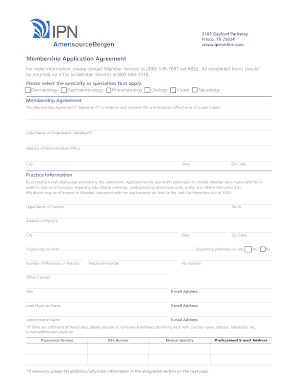
Get Ipn Amerisourcebergen Membership Application Agreement
How it works
-

Open form follow the instructions
-

Easily sign the form with your finger
-

Send filled & signed form or save
How to fill out the IPN AmerisourceBergen Membership Application Agreement online
Filling out the IPN AmerisourceBergen Membership Application Agreement online is a straightforward process designed to ensure that potential members provide all necessary information for their enrollment. This guide will walk you through each section and field of the form to help you complete it with confidence.
Follow the steps to complete your membership application form online.
- Click ‘Get Form’ button to obtain the membership application and open it in your preferred editing tool.
- Enter the legal name of your organization in the designated field. Make sure it matches your official registration.
- Provide the address of your administrative office, including city, state, and zip code.
- In the 'Practice Information' section, enter the legal name of the practice and the Tax ID.
- Include the address of your practice as well as the city, state, and zip code where it operates.
- Indicate whether there is a dispensing pharmacy on site by selecting 'Yes' or 'No' and provide the dispensing location if applicable.
- Provide the number of physicians in your practice, along with the main telephone and fax numbers.
- Enter the names and contact details (including email addresses) for the office contact, lead physician, and administrator.
- List the names, DEA numbers, medical specialties, and professional email addresses for each physician affiliated with your practice.
- In the 'Signature and Certification' section, sign the application and provide printed names, titles, and dates for authorization.
- Review the application for accuracy. Once everything is complete, save your changes and download, print, or share the form as necessary.
Complete your IPN AmerisourceBergen Membership Application Agreement online today for a seamless membership experience!