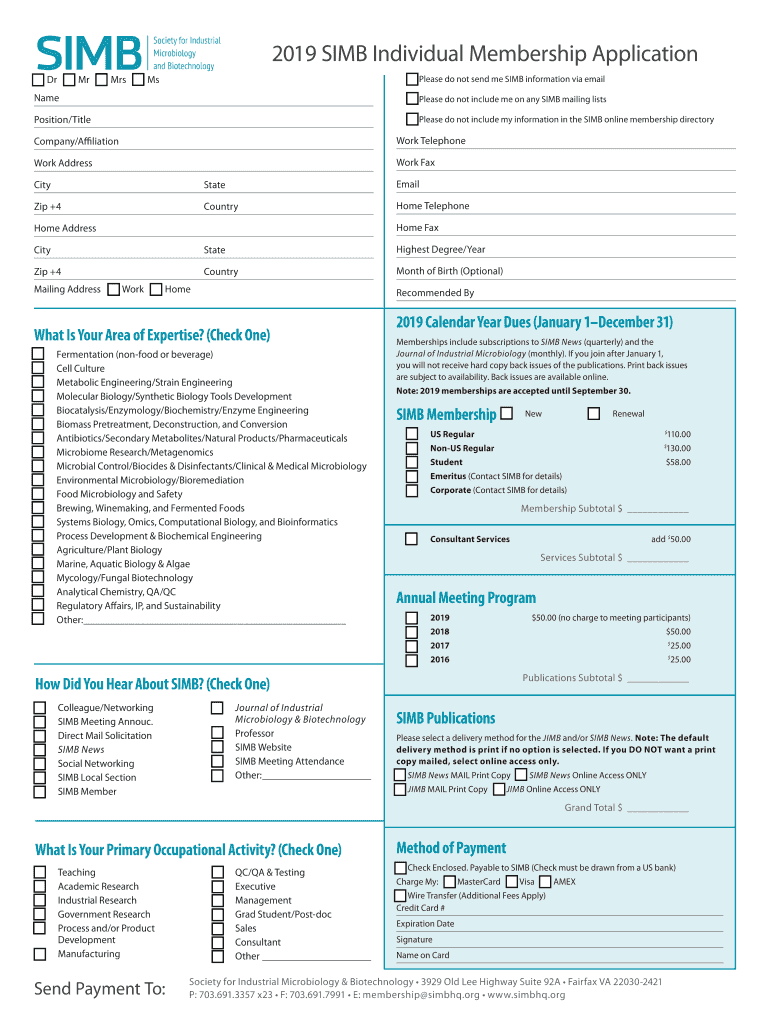
2019 SIMB Individual Membership Application o Dr o Mr o Mrs o Mso Please do not send me SIMB information via emailNameo Please do not include me on any SIMB mailing listsPosition/Titleo Please do.
Loading

Open form follow the instructions

Easily sign the form with your finger

Send filled & signed form or save
How to fill out the SIMB Individual Membership Application online
Filling out the SIMB Individual Membership Application online can be a straightforward process. This guide will provide clear, step-by-step instructions to help users complete the application with confidence and ease.
Follow the steps to complete your application online:
- Click the ‘Get Form’ button to access the application form and open it in your preferred document editor.
- Begin by specifying your title by selecting from the options: Dr, Mr, Mrs, or Ms.
- Enter your full name in the designated field, ensuring correct spelling and format.
- Indicate if you would like to opt out of receiving SIMB information via email by checking the appropriate box.
- Complete the position/title field with your current job title.
- Fill out the company/affiliation section with the name of your employer or organization.
- Provide your work telephone number, ensuring to include the area code.
- Complete the work address section with your work address details, including city, state, and ZIP code.
- If applicable, add your work fax number in the designated field.
- If you wish to provide a home telephone number, enter it in the appropriate section.
- Fill in your home address similarly, including city, state, and ZIP code.
- Complete your highest degree attained and the year it was awarded.
- Optionally, you can provide your month of birth for statistical purposes.
- Choose your preferred mailing address by checking either the work or home option.
- If recommended by someone, enter their name in the recommended by field.
- Select your area of expertise by checking the corresponding box next to the relevant option from the provided list.
- Review the dues for the 2019 calendar year and select the appropriate membership type.
- If applicable, select any consultant services and include the associated fee.
- Fill out the section related to the annual meeting program if you plan to attend.
- Indicate how you heard about SIMB by checking the appropriate box.
- Select your primary occupational activity based on the provided options.
- Choose your method of payment, and fill in the required details if paying by check or credit card.
- Review all entered information for accuracy.
- Finally, save your changes, and download, print, or share the completed application form as needed.
Complete your SIMB Individual Membership Application online today!
Experience a faster way to fill out and sign forms on the web. Access the most extensive library of templates available.
Related content
by K McCluskey · 2018 · Cited by 5 — Member. Member Benefits: • Meeting Registration...
Supplier / Vendor FAQs · Supplier / Vendor Look-up · Supplier / Vendor Maintenance ·...
This article lists the characters appearing in Disney's The Lion King franchise. Contents...
Use professional pre-built templates to fill in and sign documents online faster. Get access to thousands of forms.
If you believe that this page should be taken down, please follow our DMCA take down process here.
This form is available in several versions. Select the version you need from the drop-down list below.