Loading
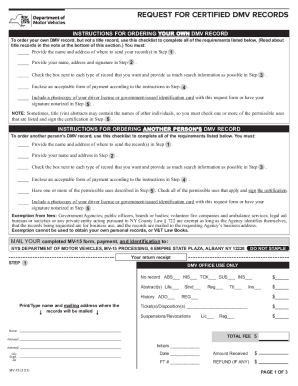
Get Ny Mv-15 2021-2026
How it works
-

Open form follow the instructions
-

Easily sign the form with your finger
-

Send filled & signed form or save
How to fill out the NY MV-15 online
Filling out the NY MV-15 form online can simplify the process of requesting certified DMV records for yourself or another person. This guide will walk you through each step, helping you complete the form efficiently and correctly.
Follow the steps to successfully complete the NY MV-15 online.
- Press the ‘Get Form’ button to obtain the form and open it in your editor.
- In Step 1, input the name and mailing address where your records should be sent. Ensure all information is accurate.
- In Step 2, provide your name, address, and signature. If this address differs from the one in Step 1, check the corresponding box.
- In Step 3, check the boxes next to each type of record you wish to receive. Provide as much search information as possible for each record, including identification numbers and relevant dates.
- For Step 4, enclose an acceptable form of payment as indicated. Remember not to send cash and ensure your check is signed.
- In Step 5, mark any permissible uses for the records you are requesting, then sign and date this section. Include a copy of your ID or have your signature notarized.
- Finally, review all entered information for accuracy, and then save your changes. You can choose to download, print, or share the completed MV-15 form as needed.
Complete your DMV records request online today for a streamlined experience.