Loading
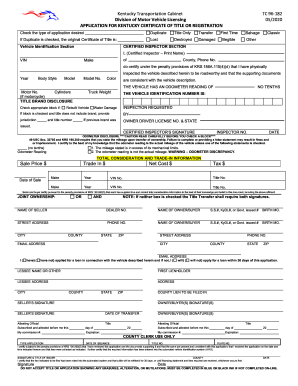
Get Ky Tc 96-182 2020
How it works
-

Open form follow the instructions
-

Easily sign the form with your finger
-

Send filled & signed form or save
How to fill out the KY TC 96-182 online
The KY TC 96-182 form is vital for applying for a certificate of title or registration in Kentucky. This guide offers clear, step-by-step instructions to help you complete the form accurately and efficiently in an online setting.
Follow the steps to successfully complete the KY TC 96-182 online.
- Click the ‘Get Form’ button to access the KY TC 96-182 form and open it in your browser's editor.
- Indicate the type of application you are submitting by checking the appropriate box: Duplicate, Title Only, or Transfer. If you selected Duplicate, provide the details of the original Certificate of Title, including if it was lost, destroyed, damaged, or if it was your first time applying.
- Complete the odometer disclosure section by stating the odometer reading and checking any applicable boxes regarding mileage discrepancies. Ensure that this information is accurate, as false statements may lead to penalties.
- Fill in the joint ownership section by indicating whether the ownership will be shared by marking the appropriate box. Make sure to include the names of the seller and buyer, along with their respective identification numbers, addresses, and contact details.
- For attestation, provide the name, title, and signature of any attesting official, along with the date of attestation. Make sure all information is clear and legible.
- Once all fields are completed, review the form for accuracy. Save any changes made, and consider downloading or printing a copy for your records.
Complete your KY TC 96-182 form online today to ensure a smooth application process.
Get form
Experience a faster way to fill out and sign forms on the web. Access the most extensive library of templates available.
Get This Form Now!
Use professional pre-built templates to fill in and sign documents online faster. Get access to thousands of forms.