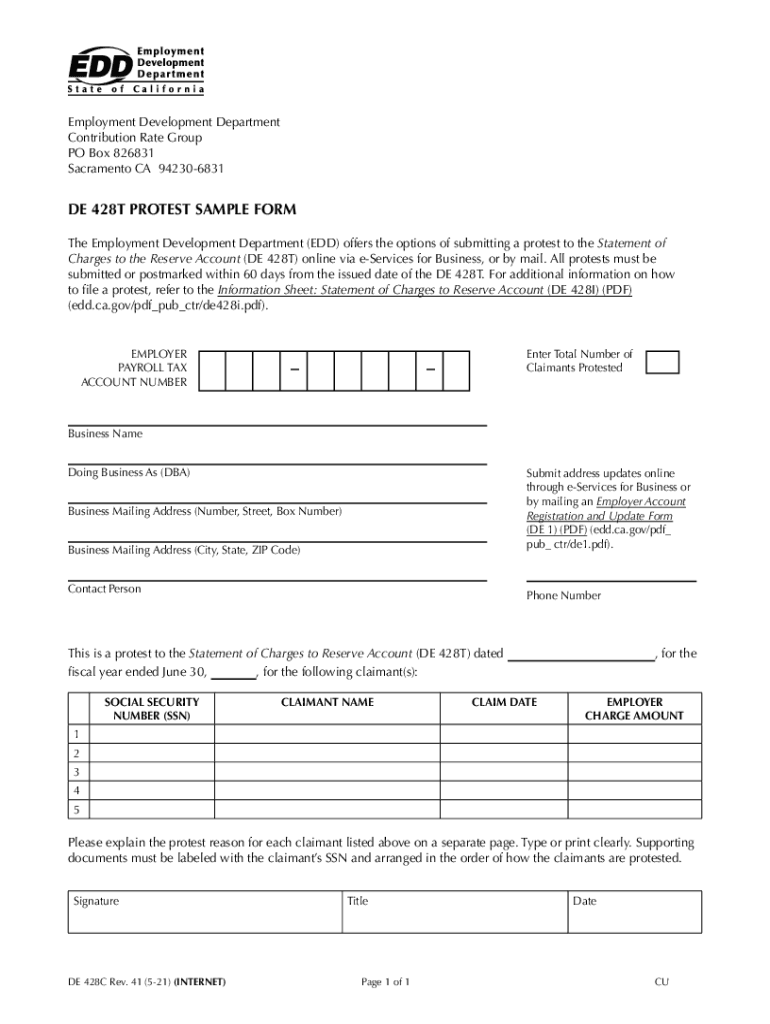
Ing a protest to the Statement of Charges to the Reserve Account (DE 428T) online via e-Services for Business, or by mail. All protests must be submitted or postmarked within 60 days from the issued date of the DE 428T. For additional information on how to file a protest, refer to the Information Sheet: Statement of Charges to Reserve Account (DE 428I) (PDF) (edd.ca.gov/pdf pub ctr/de428i.pdf). Enter Total Number of Claimants Protested EMPLOYER PAYROLL TAX ACCOUNT NUMBER Business Name Doing B.
Loading

Open form follow the instructions

Easily sign the form with your finger

Send filled & signed form or save
How to fill out the CA DE 428C online
The CA DE 428C form is an essential document for employers wishing to protest the Statement of Charges to the Reserve Account. This guide provides clear, step-by-step instructions for completing the form online, ensuring that users can navigate the process with confidence.
Follow the steps to fill out the form accurately.
- Click ‘Get Form’ button to obtain the form and access it in your online editor.
- Begin by entering the total number of claimants you are protesting in the designated field. This helps to keep track of the multiple claimants involved in your protest.
- Fill in your employer payroll tax account number. This information is critical for identifying your business within the Employment Development Department’s records.
- Provide your business name and any 'Doing Business As' (DBA) name, if applicable. Ensure that the names entered match the official records to avoid processing delays.
- Update your business mailing address, including the street number, box number, city, state, and ZIP code. Accurate address information is essential for correspondence related to your protest.
- Enter the contact person’s name and phone number. This information allows the EDD to reach out if further clarification or information is needed regarding your protest.
- Detail each claimant involved in the protest. For each claimant, include their Social Security Number (SSN), name, claim date, and the employer charge amount. Make sure to enter this information accurately to prevent any issues with your protest.
- Provide a detailed explanation for the protest for each claimant listed above on a separate page. Clarify the reasons clearly, and ensure clarity in your writing.
- Attach any supporting documents that are relevant to your protest. Label each document with the corresponding claimant's SSN and arrange them in the order of how the claimants are protested.
- Sign and date the form in the appropriate sections. Your signature validates the information provided and confirms your intention to protest.
- Once you have completed all sections, review the form thoroughly to ensure accuracy. After confirming that all information is correct, you can save changes, download, print, or share the completed form as needed.
Complete your protest forms online today to ensure a timely response to your claims.
Experience a faster way to fill out and sign forms on the web. Access the most extensive library of templates available.
Related content
The Employment Development Department (EDD) offers the options of submitting a protest to...
De La Salle High School 1130 Winton Dr Concord, CA 94518. United States. Loading... First...
greases that meet these greater demands, a Calcium ... a Calcium Sulfonate Complex...
Get answers to your most pressing questions about US Legal Forms API.
How do I fix my EDD disqualification?
If you are disqualified from receiving benefits, you have the right to appeal within 30 days of the mailing date on your Notice of Determination. Visit Unemployment Insurance Appeals for more information on the process.
How do I Unsuspend my EDD card?
Reasons for Bank of America to freeze or suspend an account include suspected fraudulent, unauthorized or unlawful activities, or a suspect transaction. EDD said you should call Bank of America at the number on the back of your card (1-866-692-9374) to resolve the situation.
How many times can you file for unemployment in California?
You can reapply for a new claim if you earned enough wages in the last 18 months and are still unemployed or working part time. Apply online, and we will notify you when your new claim is processed. This usually takes two to three weeks. For more information, refer to the unemployment insurance benefits calculator.
What is de428c?
QUESTIONS. Page 1 of 3. The DE 428T is an itemized list of benefit charges to your reserve account, which covers a one-year period beginning July 1 and ending June 30. Any benefits paid to claimants after June 30 will appear on next year's DE 428T.
How do I reactivate my EDD?
You can reopen your claim any time following the steps below: Step 1: Access your UI Online account. Log in to Benefit Programs Online and select UI Online. Step 2: Select Reopen Your Claim. Select Reopen Your Claim from the Notifications section of your UI Online homepage. ... Step 3: Check your status.
Is California forgiving EDD overpayment?
If we determine the potential overpayment was not your fault or was not due to fraud, you may qualify for an overpayment waiver. We will send you a Personal Financial Statement (DE 1446) with the Notice of Potential Overpayment.
Can you print EDD forms online?
Downloading and Printing The forms are in Portable Document Format (PDF). You may need to download the no-cost Adobe Reader to view and print linked documents.
What does a negative EDD balance mean?
Employers whose UI reserve account balance is negative (shows a minus sign before the amount) do not pay ETT and it is shown as 0.0 percent on the notice. Exception: Employers subject to section 977(c) of the CUIC. SDI Contribution Rate - This is the percentage amount to be withheld from each employee's salary.
Use professional pre-built templates to fill in and sign documents online faster. Get access to thousands of forms.
If you believe that this page should be taken down, please follow our DMCA take down process here.