Loading
Get Tamuk Form Oisss-160 2021-2026
How it works
-

Open form follow the instructions
-

Easily sign the form with your finger
-

Send filled & signed form or save
How to fill out the TAMUK Form OISSS-160 online
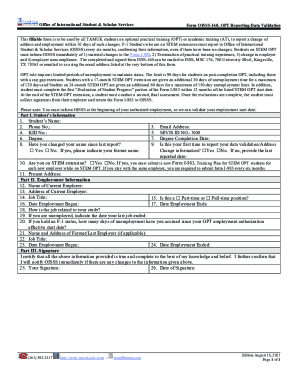
The TAMUK Form OISSS-160 is an essential document for students on optional practical training or academic training. This guide will help you understand how to fill out the form online, ensuring you provide accurate information needed for your reporting requirements.
Follow the steps to complete the TAMUK Form OISSS-160 online.
- Press the ‘Get Form’ button to access the form and open it in the editor.
- Begin with Part I, where you will provide your personal information. Fill in your name, phone number, KID number, email address, and SEVIS ID number. Additionally, indicate if you have changed your name since your last report by selecting 'Yes' or 'No' and providing your former name if applicable.
- Continue to provide your degree and degree completion date. You must also answer if this is your first time reporting your data validation/address change information by selecting 'Yes' or 'No.' If it is not your first report, include the last reported date.
- Indicate if you are on a STEM extension. If yes, remember that you are required to submit a new Form I-983 for each new employer.
- Input your present address, ensuring all details are accurate.
- Move to Part II, Employment Information. Fill in the name and address of your current employer, along with your job title.
- Specify whether your position is part-time or full-time and include the date your employment began and, if applicable, the date it ended.
- Explain how your job relates to your field of study.
- If you are unemployed, indicate the date your last job ended and detail how many days of unemployment you have accrued since your OPT employment authorization effective start date.
- If applicable, provide the name and address of your former or last employer, along with job title, and include the dates you held this position.
- In Part III, sign and date the form to certify that the information provided is true and complete.
- Once completed, save your changes, download, print, or share the form as necessary.
Complete your TAMUK Form OISSS-160 online today to stay compliant with your reporting requirements.
Select Student & Financial Aid. Select Student Records. Choose Mid-Semester Grades or Final Grades.