Loading
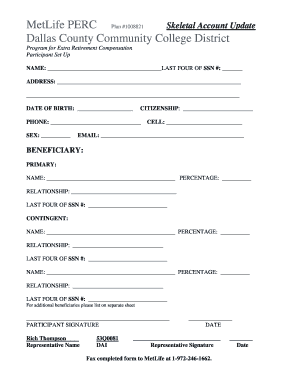
Get Metlife Perc Plan 1008795 - Dallas County Community College Bb - Dcccd
How it works
-

Open form follow the instructions
-

Easily sign the form with your finger
-

Send filled & signed form or save
How to fill out the MetLife PERC Plan 1008795 - Dallas County Community College Bb - Dcccd online
This guide provides step-by-step instructions on completing the MetLife PERC Plan 1008795 online. By following these instructions, users can efficiently fill out their forms while ensuring all necessary information is accurately recorded.
Follow the steps to complete your form online:
- Press the ‘Get Form’ button to access the form and open it in your editing tool.
- Begin by filling out your name in the designated NAME field, followed by the last four digits of your Social Security number in the corresponding field.
- Complete the ADDRESS fields by providing your current residential address, ensuring to include city, state, and zip code.
- Enter your DATE OF BIRTH into the appropriate field in the format requested.
- Indicate your CITIZENSHIP status by selecting or writing your citizenship status in the provided field.
- Fill in your PHONE number, ensuring that the number is accurate for future communications.
- Input your SEX in the designated area, using neutral and inclusive terms if necessary.
- If applicable, provide your CELL number in the respective field.
- Enter your EMAIL address in the provided field to ensure you receive notifications.
- For the BENEFICIARY section, list the primary beneficiary's NAME, PERCENTAGE of the benefit, RELATIONSHIP to you, and the last four digits of their Social Security number.
- If you wish to name additional beneficiaries, repeat the process in the CONTINGENT section, providing their NAME, PERCENTAGE, RELATIONSHIP, and last four digits of their SSN as well.
- If you need to list more beneficiaries than the form allows, complete this information on a separate sheet attached to the form.
- Sign the form in the PARTICIPANT SIGNATURE field to affirm that the information provided is correct.
- Provide the date of your signature in the space indicated.
- Ensure the representative's signature is placed where required, along with their printed name.
- Once you have completed the form, review it for accuracy, then save your changes, and proceed to fax it to MetLife at 1-972-246-1662.
Complete your documents online today for a streamlined process.
Who We Are. Dallas College, formerly the Dallas County Community College District, consists of seven campuses: Brookhaven, Cedar Valley, Eastfield, El Centro, Mountain View, North Lake and Richland.