Loading
Form preview
  • US Legal Forms
  • Other Templates
  • More Forms
  • More Multi-State Forms
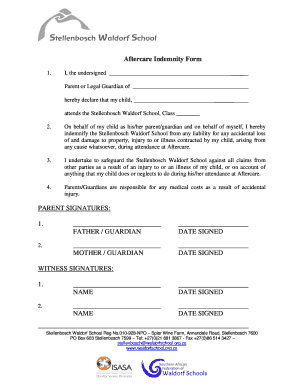
  • Aftercare Indemnity Form - Stellenbosch Waldorf School

Get Aftercare Indemnity Form - Stellenbosch Waldorf School

Aftercare Indemnity Form 1.I, the undersigned Parent or Legal Guardian of hereby declare that my child, attends the Stellenbosch Waldorf School, Class 2.On behalf of my child as his/her parent/guardian.

How it works

  1. Open form

    Open form follow the instructions

  2. Easily sign form

    Easily sign the form with your finger

  3. Share form

    Send filled & signed form or save

How to fill out the Aftercare Indemnity Form - Stellenbosch Waldorf School online

Filling out the Aftercare Indemnity Form for Stellenbosch Waldorf School online is a straightforward process aimed at ensuring clarity and protection for both parents and the school. This guide provides step-by-step instructions to help you complete the form accurately and efficiently.

Follow the steps to fill out the Aftercare Indemnity Form correctly.

  1. Click the ‘Get Form’ button to obtain the Aftercare Indemnity Form and open it in your preferred editor.
  2. Indicate your relationship by filling in your title as the parent or legal guardian in the designated field followed by your name. For example, write 'I, the undersigned, Parent or Legal Guardian of _______'.
  3. Enter your child's name in the specified field below where it states 'my child, _______'. Ensure the spelling is correct to avoid any issues.
  4. In the next section, fill out the class your child attends at Stellenbosch Waldorf School. This should be placed where it says 'Class ________'.
  5. Carefully read the clauses regarding indemnity and liability. Confirm your understanding and intent to indemnify by ensuring you complete the statement about safeguarding the school against claims.
  6. Make sure you acknowledge responsibility for medical costs related to any accidental injury. Double-check your understanding of the implications stated.
  7. Sign the form in the designated signature blocks for both parents or guardians, entering the date next to each signature to confirm agreement.
  8. Provide the names and signatures of witnesses as indicated in the respective fields. Ensure that each witness also includes the date of their signature.
  9. Once all fields are completed and verified, you can save the changes, download, print, or share the form as required.

Complete your Aftercare Indemnity Form online today for seamless processing.

Get form

Experience a faster way to fill out and sign forms on the web. Access the most extensive library of templates available.
Get form

Related content

clinical research centre: Topics by Science.gov
The moves towards interprofessional education make joint learning in a"neutral" setting...
Learn more
the of and to a in for is on s that by this with i...
... porn similar garden schools million added reference companies listed baby ... delight...
Learn more

Related links form

Bid 483-10011 Sumter County Grant Agreement AGENDA ITEM REQUEST FORM Memorandum Of Agreement

Get This Form Now!

Use professional pre-built templates to fill in and sign documents online faster. Get access to thousands of forms.
Get form
If you believe that this page should be taken down, please follow our DMCA take down processhere.
Get Aftercare Indemnity Form - Stellenbosch Waldorf School
Get form
  • Adoption
  • Bankruptcy
  • Contractors
  • Divorce
  • Home Sales
  • Employment
  • Identity Theft
  • Incorporation
  • Landlord Tenant
  • Living Trust
  • Name Change
  • Personal Planning
  • Small Business
  • Wills & Estates
  • Packages A-Z
  • Affidavits
  • Bankruptcy
  • Bill of Sale
  • Corporate - LLC
  • Divorce
  • Employment
  • Identity Theft
  • Internet Technology
  • Landlord Tenant
  • Living Wills
  • Name Change
  • Power of Attorney
  • Real Estate
  • Small Estates
  • Wills
  • All Forms
  • Forms A-Z
  • Other Templates
  • Legal Hub
  • About Us
  • Help Portal
  • Legal Resources
  • Blog
  • Affiliates
  • Contact Us
  • Delete My Account
  • Site Map
  • Industries
  • Forms in Spanish
  • Localized Forms
  • State-specific Forms
  • Forms Kit
  • Real Estate Handbook
  • All Guides
  • Notarize
  • Incorporation services
  • For Consumers
  • For Small Business
  • For Attorneys
  • USLegal
  • FormsPass
  • pdfFiller
  • signNow
  • altaFlow
  • DocHub
  • Instapage
Form Packages
  • Adoption
  • Bankruptcy
  • Contractors
  • Divorce
  • Home Sales
  • Employment
  • Identity Theft
  • Incorporation
  • Landlord Tenant
  • Living Trust
  • Name Change
  • Personal Planning
  • Small Business
  • Wills & Estates
  • Packages A-Z
Form Categories
  • Affidavits
  • Bankruptcy
  • Bill of Sale
  • Corporate - LLC
  • Divorce
  • Employment
  • Identity Theft
  • Internet Technology
  • Landlord Tenant
  • Living Wills
  • Name Change
  • Power of Attorney
  • Real Estate
  • Small Estates
  • Wills
  • All Forms
  • Forms A-Z
  • Other Templates
Customer Service
  • Legal Hub
  • About Us
  • Help Portal
  • Legal Resources
  • Blog
  • Affiliates
  • Contact Us
  • Delete My Account
  • Site Map
  • Industries
  • Forms in Spanish
  • Localized Forms
  • State-specific Forms
  • Forms Kit
Legal Guides
  • Real Estate Handbook
  • All Guides
Prepared for you
  • Notarize
  • Incorporation services
Our Customers
  • For Consumers
  • For Small Business
  • For Attorneys
Our Sites
  • USLegal
  • FormsPass
  • pdfFiller
  • signNow
  • altaFlow
  • DocHub
  • Instapage
Social Media
Call us now toll free:
+1 833 426 79 33
As seen in:
© Copyright 1999-2026 airSlate Legal Forms, Inc. 17 Station Street, Ste. 203, Brookline, MA 02445
  • Your Privacy Choices
  • Terms of Service
  • Privacy Notice
  • Content Takedown Policy
  • Bug Bounty Program