Loading
Get Sar 66
How it works
-

Open form follow the instructions
-

Easily sign the form with your finger
-

Send filled & signed form or save
How to fill out the Sar 66 online
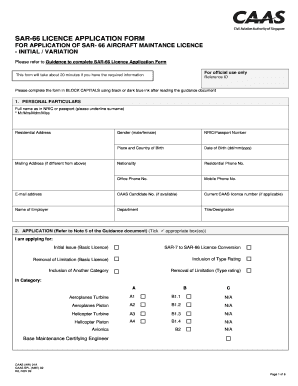
The Sar 66 Licence Application Form is essential for individuals seeking to apply for or modify their aircraft maintenance licence. This guide provides clear and supportive instructions on how to fill out the form online effectively.
Follow the steps to complete your Sar 66 application online.
- Click the ‘Get Form’ button to obtain the form and open it in your editor.
- In the 'Personal Particulars' section, fill in your full name as it appears on your NRIC or passport, making sure to underline your surname. Provide your residential address, gender, NRIC or passport number, place and country of birth, date of birth (in dd/mm/yyyy format), nationality, and contact numbers. It's important to use block capitals and black or dark blue ink.
- For the 'Application' section, tick the appropriate box for your application type such as 'Initial Issue' or 'Type Rating Inclusion.' Ensure that you provide any additional details required for your selected application type.
- Complete the 'Summary of Experience' section by detailing your aviation experience, including dates, aircraft type, engines, and a description of the work you have done. Use the provided fields to specify any experience credit you wish to claim.
- In the 'Exam Modules Completed' section, tick the boxes for any modules you have successfully completed and provide details on examinations, if applicable.
- Proceed to fill out the section regarding your current aircraft type ratings held on your Sar-7 licence, providing the necessary details such as licence category, aircraft type, and date of initial issue.
- Complete the sections for 'Application for SAR-66 Type Ratings' and 'Application for Removal of Type Rating Limitations' with accurate details regarding the aircraft types, engines, and limitations you wish to remove.
- In the 'Declaration' section, affirm the truthfulness of the information provided and sign and date the declaration to confirm your understanding of the responsibilities associated with the licence.
- If applicable, fill out the 'Referee’s Declaration' by having a referee complete their information and signature, confirming your eligibility.
- Complete the 'Payment Details' section as required for CAAS use only, noting the method of payment and other relevant details.
- Finally, review your completed form for accuracy, then save, download, or print the form as needed. Follow the submission instructions provided to send your application to the appropriate address.
Begin your Sar 66 application process online today!
European Aviation Safety Agency (EASA) Part 145 Approval is a company level certification to the European Commission Regulation standards of design, production, maintenance and operation of aircraft components. An aircraft component is described as any product, part, or appliance installed in European aircraft.