Loading
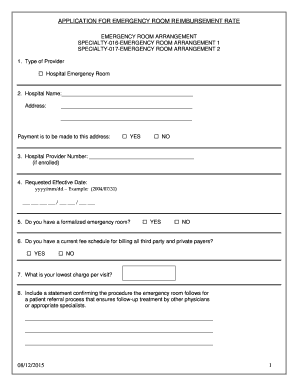
Get Application For Emergency Room Reimbursement Rate
How it works
-

Open form follow the instructions
-

Easily sign the form with your finger
-

Send filled & signed form or save
How to fill out the APPLICATION FOR EMERGENCY ROOM REIMBURSEMENT RATE online
Completing the Application for Emergency Room Reimbursement Rate online is a straightforward process that requires attention to detail. This guide will assist users in filling out the form efficiently and accurately, ensuring all necessary information is provided.
Follow the steps to successfully complete the application.
- Click ‘Get Form’ button to obtain the form and open it in the online editor.
- Begin by identifying the type of provider. Select the appropriate option, such as 'Hospital Emergency Room', from the provided checkbox.
- Enter the hospital name and address in the designated fields. Be sure to include the street address, city, state, and zip code accurately.
- Indicate if payment should be made to the provided address by checking 'YES' or 'NO'.
- Fill in the hospital provider number if enrolled, or leave it blank if not applicable.
- Specify the requested effective date in the format yyyy/mm/dd. For example, 2023/10/01.
- Answer whether a formalized emergency room is available by checking 'YES' or 'NO'.
- Indicate if there is a current fee schedule for billing third party and private payers, and check the corresponding box.
- State the lowest charge per visit in the provided field.
- Provide a statement confirming the emergency room's procedure for patient referral to ensure follow-up treatment.
- List the names of the physicians who staff the emergency room in the specified section.
- Indicate whether the emergency room provides comprehensive medical services for at least forty hours a week by selecting 'YES' or 'NO'.
- Confirm if a licensed physician is present at all scheduled hours by checking the appropriate option.
- Answer if emergency room physicians have the authority to independently admit patients to the hospital and provide clarification if needed.
- Specify how the emergency room is operated, particularly if not directly managed by the hospital.
- Select the applicable emergency room arrangement by checking the relevant option, whether it involves independent physicians or contract physicians.
- Confirm that the information provided is true by signing and dating the application at the end.
- Once all sections are complete, users can save changes, download the completed form, print it, or share it as needed.
Complete your documents online now to ensure timely reimbursement processing.
patient with rapidly changing condition. Code Silver: Weapon/Hostage. Code 5: Shelter in Place. Unsafe situation.
Industry-leading security and compliance
US Legal Forms protects your data by complying with industry-specific security standards.
-
In businnes since 199725+ years providing professional legal documents.
-
Accredited businessGuarantees that a business meets BBB accreditation standards in the US and Canada.
-
Secured by BraintreeValidated Level 1 PCI DSS compliant payment gateway that accepts most major credit and debit card brands from across the globe.