Loading
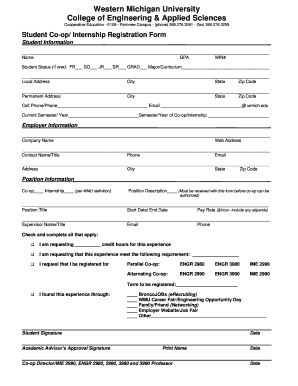
Get Student Co-op/ Internship Registration Form - Wmich
How it works
-

Open form follow the instructions
-

Easily sign the form with your finger
-

Send filled & signed form or save
How to fill out the Student Co-op/ Internship Registration Form - Wmich online
This guide provides clear and comprehensive instructions for completing the Student Co-op/ Internship Registration Form - Wmich online. Follow these steps to effectively fill out the form and ensure all necessary information is provided.
Follow the steps to complete your registration form successfully.
- Click ‘Get Form’ button to obtain the form and open it in the editor.
- Fill in your personal information, including your name, GPA, WIN number, and student status. Be sure to check the appropriate box for your current status, whether you are a freshman, sophomore, junior, senior, or graduate student. Provide your major or curriculum in the designated space.
- Complete the local and permanent address sections accurately, including city, state, and zip code. Make sure to provide a contact phone number and your wmich.edu email address.
- Indicate the current semester and year, as well as the semester and year during which you will be undertaking the co-op or internship.
- Provide employer information by filling out the company name and web address, followed by the contact person's name, title, phone, and email. Ensure that the address is complete with city, state, and zip code.
- In the position information section, specify whether the opportunity is a co-op or internship, according to WMU definitions. Include a position description, position title, start and end dates, and the pay rate, including any stipends.
- Fill out the supervisor's name, title, email, and phone number to ensure they can be contacted easily.
- Select appropriate options for credit hours and any requirements the experience should meet. Register for the correct parallel or alternating co-op courses as applicable.
- Indicate how you found this experience by checking the appropriate box or specifying details in the provided space.
- Finally, sign and date the form. Ensure you obtain the necessary approvals from your academic advisor and the co-op director. Their signatures and printed names are essential for processing your registration.
- After filling out all required fields and obtaining necessary approvals, save your changes. You can then download, print, or share the form as needed.
Complete your Student Co-op/ Internship Registration Form online now to secure your opportunity.
Industry-leading security and compliance
US Legal Forms protects your data by complying with industry-specific security standards.
-
In businnes since 199725+ years providing professional legal documents.
-
Accredited businessGuarantees that a business meets BBB accreditation standards in the US and Canada.
-
Secured by BraintreeValidated Level 1 PCI DSS compliant payment gateway that accepts most major credit and debit card brands from across the globe.