Loading
Get Application For New: Salesperson / Broker - Reco
How it works
-

Open form follow the instructions
-

Easily sign the form with your finger
-

Send filled & signed form or save
How to fill out the Application For New: Salesperson / Broker - RECO online
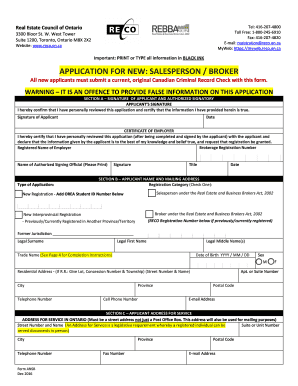
Filling out the Application For New: Salesperson / Broker - RECO online is a straightforward process that will help you start your journey in the real estate profession in Ontario. This guide provides detailed instructions to ensure you complete the application accurately and efficiently.
Follow the steps to complete your application online.
- Click ‘Get Form’ button to obtain the form and open it in the editor.
- Complete Section A, providing your signature and the signature of your authorized signatory if applicable. Ensure that you date the application to confirm the submission date.
- In Section B, fill in your legal name and mailing address. Provide essential details such as date of birth, sex, residential address, and contact information. Select your registration category by checking the appropriate box.
- Proceed to Section C and provide your address for service in Ontario, ensuring it is a street address and not just a Post Office Box.
- In Section D, review the notice and consent carefully. Acknowledge your understanding and acceptance by providing your name and signature.
- Enter your employment history in Section E, detailing the last two years of employment or activities, including any gaps in your employment status.
- Answer the disclosure questions in Section F honestly. If necessary, include additional documentation to support any affirmative answers.
- Review the completion instructions provided on the form for specific sections where applicable. Pay attention to requirements for new applicants and interprovincial registrants.
- Finalize the application by checking all sections for accuracy and completeness. Save your changes, and consider downloading or printing the form for your records.
- Submit your completed application form via email or fax to the RECO, ensuring you include any necessary attachments.
Begin your application process online to become a registered salesperson or broker with RECO today.