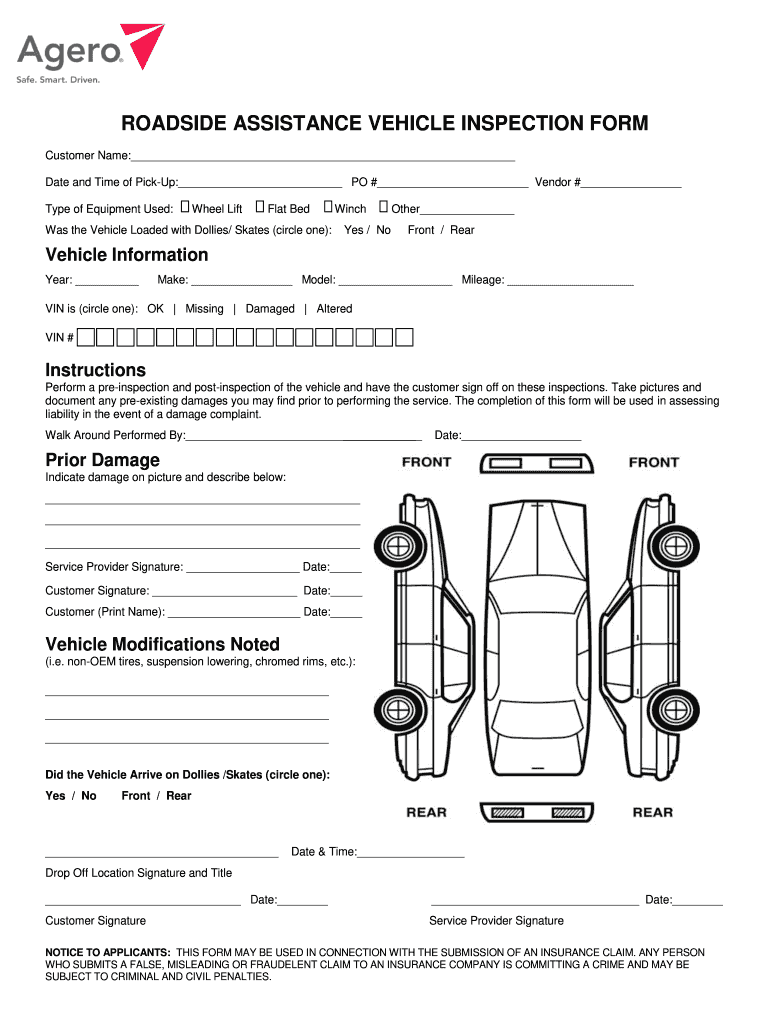
ROADSIDE ASSISTANCE VEHICLE INSPECTION FORM Customer Name: Date and Time of Pick-Up: PO # Vendor # Type of Equipment Used: Wheel Lift Flat Bed Winch Was the Vehicle Loaded with Dollies/ Skates (circle.
Loading

Open form follow the instructions

Easily sign the form with your finger

Send filled & signed form or save
How to fill out the Agero Roadside Assistance Vehicle Inspection online
This guide provides clear, step-by-step instructions for filling out the Agero Roadside Assistance Vehicle Inspection form online. By following these guidelines, users can ensure that all required information is accurately captured, which will facilitate the vehicle inspection process and help manage potential liability.
Follow the steps to successfully complete the vehicle inspection form
- Click ‘Get Form’ button to obtain the form and open it in the designated editing workspace.
- Enter the customer name in the designated field at the top of the form to identify the individual requesting roadside assistance.
- Fill in the date and time of pick-up in the respective fields. This information is critical for tracking the service provided.
- Document the purchase order number (PO #) and vendor number (Vendor #) if available, ensuring you have accurate reference numbers for your records.
- Select the type of equipment used from the provided options: Wheel Lift, Flat Bed, or Winch. This specifies the method of transport for the vehicle.
- Indicate whether the vehicle was loaded with dollies or skates by circling 'Yes' or 'No.' If applicable, provide other relevant details in the space provided.
- Fill out the vehicle information including year, make, model, and mileage to provide detailed identification of the vehicle being inspected.
- Indicate the status of the vehicle identification number (VIN) and complete the VIN number field, ensuring accurate record-keeping.
- Conduct pre-inspection and post-inspection checks of the vehicle, documenting any pre-existing damages found. These findings should be recorded in the designated section.
- Ensure that both the service provider and customer sign and date the form to acknowledge the inspection results and any noted damages.
- Fill in any modifications to the vehicle in the vehicle modifications section to ensure that all aspects of the vehicle condition are noted.
- Document the drop-off location and secure a signature from the customer upon vehicle handoff to confirm receipt.
- Upon completion, save changes to the form. Users can download, print, or share the completed form as needed for their records.
Complete your documents online today to ensure a smooth roadside assistance experience.
Experience a faster way to fill out and sign forms on the web. Access the most extensive library of templates available.
Related content
... AGERO ADMINISTRATIVE SERVICE CORP USDOT ... roadside inspection process for inspecting...
by TE Trimble · Cited by 4 — Applus offers the Vehicle Information Platform (VIP)...
Get answers to your most pressing questions about US Legal Forms API.
Do you have to file a claim for roadside assistance?
Typically, you do not need to file a claim for roadside assistance if you use services like Agero Roadside Assistance. Most roadside assistance plans allow you to receive help without upfront costs, addressing your immediate needs. However, if your situation requires further services or repairs, review your policy to understand any potential claim requirements.
What is Agero Roadside Assist?
Agero Roadside Assist is a comprehensive support system for vehicle emergencies. This service includes features such as 24/7 communication, quick response times, and a network of trusted professionals. With Agero, you can feel confident knowing that assistance is only a call away, ensuring your vehicle inspection and roadside needs are promptly addressed.
What is Agero Roadside Assistance?
Agero Roadside Assistance is a service designed to help drivers in distress. If your car breaks down or you experience an emergency, Agero dispatches help to your location. They offer a variety of services, including vehicle inspection, towing, and fuel delivery. Their goal is to provide peace of mind during unforeseen situations.
How does roadside assistance work?
Roadside assistance provides support when your vehicle encounters issues on the road. When you experience a breakdown, you can contact your service provider, like Agero Roadside Assistance. They dispatch a professional to your location to help. The services can range from towing to tire changes, ensuring you get back on your journey quickly and safely.
How can I get roadside assistance immediately?
To get roadside assistance immediately, simply call your service provider or use their mobile app to request help. If you're a member of a plan that includes Agero Roadside Assistance Vehicle Inspection, you can expect a quick response and efficient service. Make sure to provide your location and the nature of your problem for the fastest support. Additionally, US Legal Forms offers resources to help you understand your options and rights related to roadside assistance.
Is insurance roadside assistance worth it?
Investing in insurance roadside assistance can provide peace of mind when you encounter vehicle trouble. With features like the Agero Roadside Assistance Vehicle Inspection, you gain access to experienced professionals who can assess your vehicle's condition and provide necessary services. This assistance can save you time, reduce stress, and prevent costly repairs down the line. Consider how often you use your vehicle; the reliability and support from a service like Agero can be invaluable.
What is Agero roadside assistance number?
To reach Agero Roadside Assistance, you can often find the dedicated phone number directly within your insurance policy documentation or on their official website. This number connects you to trained representatives who can swiftly dispatch help to your location. Keeping this number handy can save you valuable time when you face a roadside emergency. For a seamless experience, consider the Agero Roadside Assistance Vehicle Inspection to prevent incidents before they occur.
Who are Agero Roadside competitors?
Agero's competitors and similar companies include Boundless Rider, Turbo, TruckPark and Esatroll. Agero is working with vehicle manufacturers and insurance carriers to develop the next generation of vehicle and mobile technology.
What are the 3 types of clients agero offers services?
Services | Roadside Assistance, Accident Management, & More | Agero.
Who owns Agero roadside assistance?
A Cross Country Group Company.
Use professional pre-built templates to fill in and sign documents online faster. Get access to thousands of forms.
If you believe that this page should be taken down, please follow our DMCA take down process here.