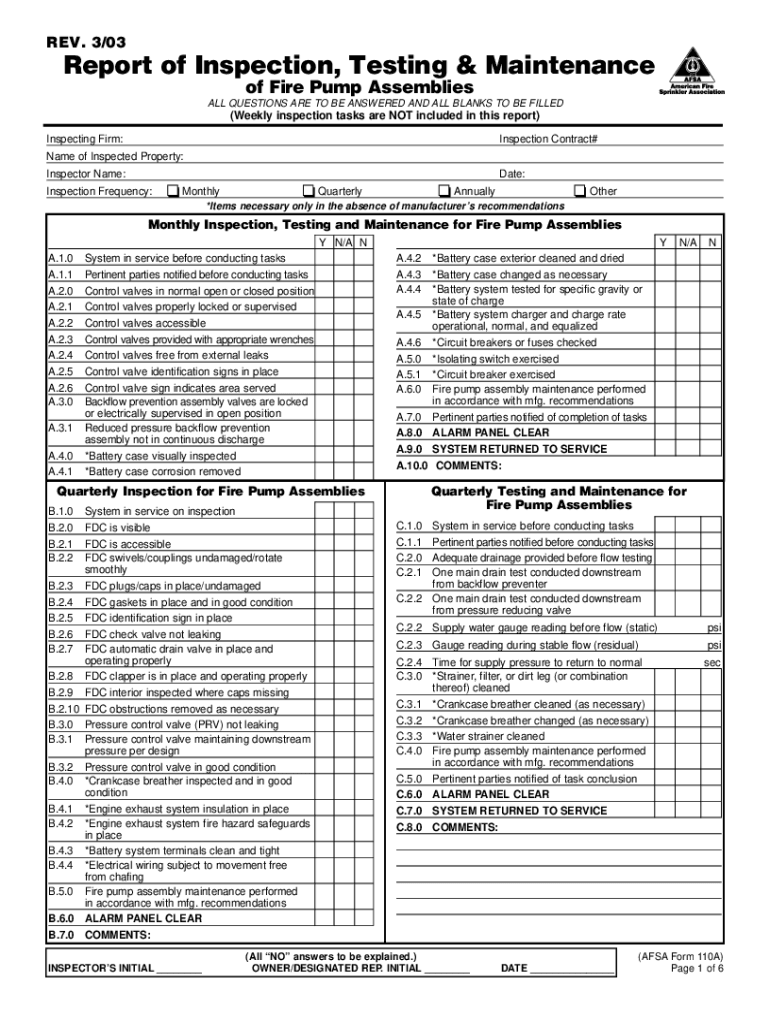
Nspecting Firm: Inspection Contract# Name of Inspected Property: Inspector Name: Date: Inspection Frequency: Monthly Quarterly Annually Other *Items necessary only in the absence of manufacturer’s recommendations Monthly Inspection, Testing and Maintenance for Fire Pump Assemblies Y N/A N A.1.0 A.1.1 A.2.0 A.2.1 A.2.2 A.2.3 A.2.4 A.2.5 A.2.6 A.3.0 A.3.1 A.4.0 A.4.1 System in service before conducting tasks Pertinent parties notified before conducting tasks Control valves in normal o.

Open form follow the instructions

Easily sign the form with your finger

Send filled & signed form or save
How to fill out the AFSA 110A online
The AFSA 110A is an essential form for reporting the inspection, testing, and maintenance of fire pump assemblies. This guide provides a step-by-step approach to assist users in completing the form accurately and efficiently.
Follow the steps to fill out the AFSA 110A form online.
- Press the ‘Get Form’ button to access the AFSA 110A form and open it in the appropriate editor.
- Begin by entering the inspecting firm name and the inspection contract number in the designated fields at the top of the form.
- Provide the name of the inspected property and the name of the inspector in their respective fields.
- Select the inspection frequency by choosing from options such as monthly, quarterly, annually, or other, depending on the specifics of your inspection.
- For each section corresponding to monthly, quarterly, semi-annual, annual maintenance, and testing for fire pump assemblies, indicate 'Y' (Yes), 'N/A' (Not Applicable), or 'N' (No) based on the inspection results. Ensure all questions are answered and all blanks are filled.
- Provide comments or additional information as needed in the comments section of each inspection category.
- After completing all sections, ensure any 'NO' answers are adequately explained, as required.
- Finally, save your changes, download a copy of the completed form, print it for your records, or share it as needed.
Complete your AFSA 110A form online to ensure compliance and accurate documentation of your fire pump inspections.
Experience a faster way to fill out and sign forms on the web. Access the most extensive library of templates available.
Related content
(AFSA) provides information about the Foreign Service Clause, including sample language...
by D Arner · Cited by 155 — 110 A test lacks this feature; it is a one-time event, and...
Get answers to your most pressing questions about US Legal Forms API.
Why are bankruptcies denied?
Bankruptcies can be denied for several reasons related to AFSA 110A guidelines. Common issues include not meeting the means test requirements, incomplete documentation, or failing to attend mandatory credit counseling sessions. It's crucial to follow all procedures carefully to avoid denial. If you face challenges, consider seeking help from resources like USLegalForms to improve your chances of a successful filing.
Is it hard to file Chapter 7?
Filing for Chapter 7 bankruptcy can seem overwhelming, but it can be straightforward with the right information. AFSA 110A simplifies the process by providing clear guidelines and necessary forms. Many individuals benefit from professional assistance to help them understand eligibility criteria and complete paperwork accurately. Utilizing platforms like USLegalForms can streamline this experience for you.
What disqualifies you from filing bankruptcies?
Certain factors can disqualify you from filing for bankruptcy under AFSA 110A. For instance, if you have previously filed for bankruptcy and have not waited the required time period, this may hinder your ability to file again. Additionally, any fraudulent activity, such as hiding assets or providing false information, can lead to disqualification. Understanding these factors can help you navigate the process more smoothly.
Do parents who make $120000 still qualify for FAFSA?
Yes, parents who earn $120,000 can still qualify for FAFSA assistance. Financial aid eligibility is based on various factors, including family size and the number of students attending college. The AFSA 110A regulations provide a framework for understanding this process. It’s always wise to apply, as aid packages can vary significantly.
What is the most common mistake made on the FAFSA?
The most common mistake on the FAFSA is omitting one or more required signatures. A missing signature can entirely disqualify your application. Ensure that you and your parents sign electronically if you’re filing online, as highlighted in the AFSA 110A requirements. This small step prevents delays in processing your financial aid.
How do I fill out a FAFSA step by step?
Start by creating an FSA ID to access the FAFSA online. Then, follow these steps: enter your personal information, your financial details, and list the schools you are interested in. Always refer to AFSA 110A guidance during the process. Finally, review your application for accuracy and submit it before the deadline.
How do I fill out an FSA form?
To fill out an FSA form, first gather your financial documents, including tax returns and bank statements. Begin entering the requested information carefully, ensuring that you follow the AFSA 110A instructions to avoid missing key details. Make sure you use the correct format for dates and numbers. This will help you complete the form efficiently.
What is the #1 most common FAFSA mistake?
The most common FAFSA mistake involves inaccurate reporting of income or tax information. It's essential to check that your figures align with your tax return, as errors can lead to delays or a lower aid offer. Referencing AFSA 110A details can help ensure your application stays accurate. Always double-check your entries before submission.
What not to put on FAFSA?
When filling out the FAFSA, avoid including your retirement savings, life insurance policies, and your parents' primary residence. These assets do not count towards your Expected Family Contribution (EFC) according to the AFSA 110A guidelines. Focus instead on income and savings accounts. This approach ensures you present a clearer financial picture.
Use professional pre-built templates to fill in and sign documents online faster. Get access to thousands of forms.
If you believe that this page should be taken down, please follow our DMCA take down process here.