Loading
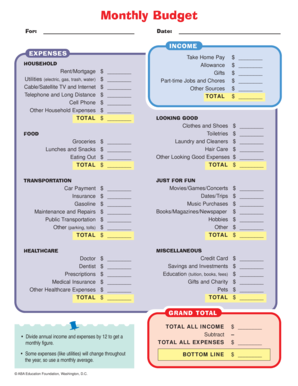
Get Monthly Budget Worksheet - In
How it works
-

Open form follow the instructions
-

Easily sign the form with your finger
-

Send filled & signed form or save
How to fill out the Monthly Budget Worksheet - In online
Creating and managing a budget is essential for maintaining financial health. This guide will help you navigate the Monthly Budget Worksheet - In online, ensuring that you accurately track your income and expenses.
Follow the steps to effectively complete your monthly budget worksheet.
- Click ‘Get Form’ button to obtain the Monthly Budget Worksheet and open it for editing.
- Fill in your personal details, including your name and the date at the top of the form.
- Begin with the 'Income' section. List all sources of income you receive each month, ensuring to account for all earnings.
- Next, proceed to the 'Expenses' section. Enter your monthly household expenses, such as rent/mortgage, utility bills, and other essential costs.
- Continue with the 'Looking Good' section. This includes expenses related to clothing, grooming, and personal care.
- Fill out the 'Food' section by recording your grocery costs, dining out, and other food-related expenses.
- Document entertainment expenses in the 'Just for Fun' section. Include costs related to movies, hobbies, and social activities.
- Complete the 'Transportation' section with relevant costs like car payments, gas, and public transportation.
- Fill in the 'Healthcare' section with your medical expenses, including doctor visits, prescriptions, and insurance.
- Include any additional expenses in the 'Miscellaneous' category, ensuring that no costs are overlooked.
- After entering all your expenses, calculate your total income and total expenses to find your financial standing.
- Finally, review your entries for accuracy. Save changes, download, print, or share the completed form as needed.
Complete your Monthly Budget Worksheet online today and take control of your finances.
The biggest chunk, 70%, goes towards living expenses while 20% goes towards repaying any debt, or to savings if all your debt is covered. The remaining 10% is your 'fun bucket', money set aside for the things you want after your essentials, debt and savings goals are taken care of.