Loading
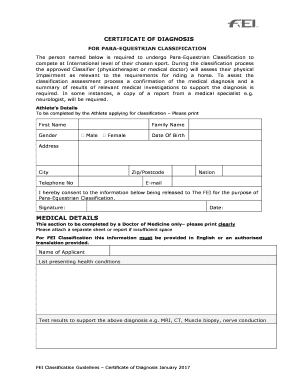
Get Diagnosis Certificate
How it works
-

Open form follow the instructions
-

Easily sign the form with your finger
-

Send filled & signed form or save
How to fill out the Diagnosis Certificate online
Filling out the Diagnosis Certificate is an essential step in the Para-Equestrian Classification process. This guide provides clear and supportive instructions to help you competently complete the document online.
Follow the steps to successfully fill out your Diagnosis Certificate
- Click ‘Get Form’ button to obtain the certificate and open it in the editor.
- Begin by entering the athlete’s details. Fill in the first name, family name, date of birth, address, city, telephone number, zip/postcode, nation, and email address. Ensure all information is accurate and spelled correctly.
- Select the gender option that applies to the athlete by marking the appropriate box next to 'Male' or 'Female'.
- In the consent section, the athlete must provide their signature and date to authorize the release of information to the FEI for classification purposes.
- Move to the medical details section, which must be filled out by a Doctor of Medicine. The doctor should print clearly and attach additional reports if necessary.
- Enter the name of the applicant and list all presenting health conditions annotated by the doctor.
- Include test results that support the diagnosis, such as MRI or CT scans. It's vital that this medical information is in English or comes with an authorized translation.
- Document the resulting permanent impairments, which may include any conditions affecting muscle power or limb movement.
- The doctor must certify their relationship to the patient by stating how long they have followed the patient, providing their name, address, and signature, along with the date.
- Once all sections are complete, review the entire document for any mistakes before saving changes, downloading, printing, or sharing the completed form.
Start completing your Diagnosis Certificate online today to ensure a smooth classification process.
To request a letter please book a digital appointment with a GP, who will be able to assess the situation and assist you as appropriate. When a letter is generated, you will receive this by post.