Loading
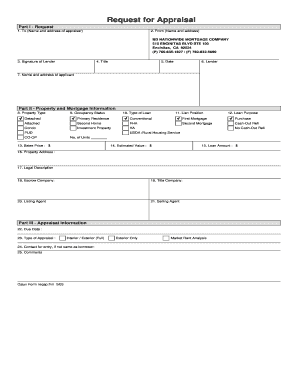
Get Appraisal Request Form - Nationwide Mortgage Loans
How it works
-

Open form follow the instructions
-

Easily sign the form with your finger
-

Send filled & signed form or save
How to fill out the Appraisal Request Form - Nationwide Mortgage Loans online
Filling out the Appraisal Request Form is an essential step in the mortgage loan process. This guide is designed to provide you with clear instructions on how to complete the form accurately and efficiently, ensuring you have all necessary information at your fingertips.
Follow the steps to complete your online appraisal request form
- Click ‘Get Form’ button to access the form and open it in the editing interface.
- In Part I - Request, begin by filling out the 'To' field with the name and address of the appraiser. This information is critical for directing the request appropriately.
- Next, enter your details in the 'From' section, using your name and address. It is important to provide accurate contact information.
- Sign the form in the designated 'Signature of Lender' section to validate your request.
- Indicate your title in the corresponding field to specify your role in the appraisal process.
- Record the date of submission to establish a timeline for the appraisal.
- Fill in the lender's name in the provided field to clearly identify the lending institution.
- Complete the applicant's name and address section with the information of the person applying for the loan.
- In Part II - Property and Mortgage Information, select the appropriate property type from the listed options, such as detached, attached, condo, or co-op.
- Indicate the occupancy status, choosing from options such as primary residence, second home, or investment property.
- Choose the type of loan being applied for, specifying conventional, FHA, VA, USDA, or others as relevant.
- Identify the lien position of the mortgage, marking either first mortgage or second mortgage.
- Explain the loan purpose by selecting from the options provided, such as purchase, cash-out refinance, or no cash-out refinance.
- Provide the sales price of the property in the designated field.
- Enter the estimated value of the property.
- Fill in the total loan amount requested.
- Clearly indicate the complete property address.
- Provide the legal description of the property to ensure correct identification.
- List the escrow company involved in the transaction, if applicable.
- Include the title company’s name that will handle the closing.
- Mention the listing agent’s name for reference.
- Provide information about the selling agent as well.
- In Part III - Appraisal Information, set a due date for the appraisal to be completed.
- Select the type of appraisal required, indicating whether it is an interior/exterior (full) or exterior only.
- If there is a different contact person for entry, provide their name and contact details.
- Add any additional comments that may be relevant to the appraisal process.
- After filling in all necessary fields, ensure to save your changes, download, print, or share the form as needed.
Complete your Appraisal Request Form online today!