Loading
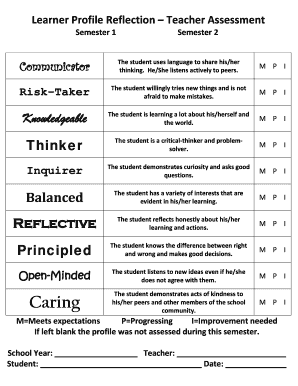
Get Learner Profile Reflection Teacher Assessment
How it works
-

Open form follow the instructions
-

Easily sign the form with your finger
-

Send filled & signed form or save
How to fill out the Learner Profile Reflection Teacher Assessment online
This guide provides clear instructions on how to effectively complete the online Learner Profile Reflection Teacher Assessment. By following the steps outlined, you can ensure a thorough and accurate reflection of the student's learning and development.
Follow the steps to fill out the assessment form successfully.
- Press the ‘Get Form’ button to access the Learner Profile Reflection Teacher Assessment form and open it for editing.
- Begin filling out the 'School Year' field with the appropriate academic year for the assessment.
- Enter the name of the teacher responsible for completing the assessment in the 'Teacher' field.
- Input the student's name in the 'Student' section to clearly identify whose progress is being assessed.
- Date the assessment by filling out the 'Date' field with the current date to mark when the evaluation is completed.
- In the assessment sections (Communicator, Risk-Taker, Knowledgeable, Thinker, Inquirer, Balanced, Reflective, Principled, Open-Minded, Caring), select one of the options (M, P, I) for each attribute to reflect the student's performance.
- If any sections remain blank, this indicates that the profile was not assessed for that semester.
- Once all fields are completed, review the form for accuracy before proceeding to save, download, print, or share the assessment.
Complete the Learner Profile Reflection Teacher Assessment online to support student growth and development.
An example of reflective learning is a person who starts a new hobby, and asks themself how well they're learning the new information that comes with the hobby, whether there are any gaps in their knowledge, and which learning strategies they enjoy using the most.