Loading
Get Billing Fenaka Corp
How it works
-

Open form follow the instructions
-

Easily sign the form with your finger
-

Send filled & signed form or save
How to fill out the Billing Fenaka Corp online
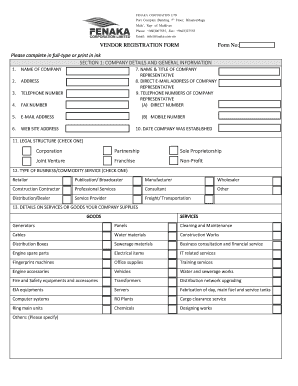
Filling out the Billing Fenaka Corporation vendor registration form is an essential step for businesses looking to engage with Fenaka Corporation. This guide will provide clear, step-by-step instructions to help users successfully complete the form online, ensuring that all necessary information is accurately provided.
Follow the steps to complete the vendor registration form seamlessly.
- Click the ‘Get Form’ button to access the vendor registration form and open it in your editor.
- Begin by entering your company details in Section 1: Company details and general information. This includes the name of your company, address, telephone number, fax number, email address, and website address.
- Fill in the name and title of the company representative along with their direct email address and telephone numbers, including both a direct number and a mobile number.
- Provide the date your company was established, and select the legal structure of your business by checking one of the available options such as corporation, partnership, or sole proprietorship.
- Specify the type of business or commodity service your company provides by checking the appropriate box, such as retailer, manufacturer, or service provider.
- Detail the services or goods your company supplies in the provided section, clearly listing each item or service.
- Indicate your geographic service area by checking the appropriate option (local, regional, national, or international) and specify if necessary.
- Answer whether you have previously done business with Fenaka Corporation and provide the relevant years if applicable.
- Move on to Section 2: Banking information. Fill out the required banking details including the bank name, address, beneficiary name, international bank account number (IBAN), SWIFT code, account currency, and bank account number.
- In Section 3: Supporting documentation, ensure you have all required documents ready to submit, such as your company profile and copies of your certificate of incorporation and GST registration.
- Return to the form to complete Section 4: Certification. Here, read and agree to the terms and conditions, and provide your name, title, signature, and the date.
- Review all information entered for accuracy and completeness before finalizing your submission.
- Depending on your preference, save changes, download the completed form, print it, or share it as required.
Complete the Billing Fenaka Corp vendor registration form online today to ensure your business is registered with Fenaka Corporation.
Ahmed Saeed Mohamed, Managing Director - Fenaka.
Industry-leading security and compliance
US Legal Forms protects your data by complying with industry-specific security standards.
-
In businnes since 199725+ years providing professional legal documents.
-
Accredited businessGuarantees that a business meets BBB accreditation standards in the US and Canada.
-
Secured by BraintreeValidated Level 1 PCI DSS compliant payment gateway that accepts most major credit and debit card brands from across the globe.