Loading
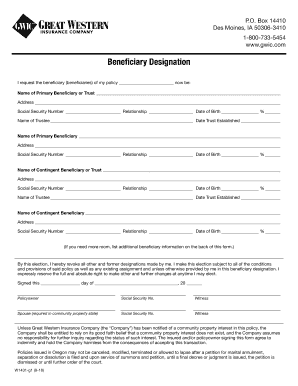
Get Great Western Insurance Claim Form
How it works
-

Open form follow the instructions
-

Easily sign the form with your finger
-

Send filled & signed form or save
How to fill out the Great Western Insurance Claim Form online
Filling out the Great Western Insurance Claim Form online can streamline the process of designating beneficiaries for your policy. This guide provides clear, detailed instructions to ensure you complete your form accurately and efficiently.
Follow the steps to complete the Great Western Insurance Claim Form online.
- Press the ‘Get Form’ button to access the form and open it in the editor.
- In the 'Beneficiary Designation' section, enter the name of the primary beneficiary or trust in the designated field.
- Provide the address of the primary beneficiary in the respective field to ensure accurate communication.
- Input the Social Security number of the primary beneficiary in the assigned space for verification purposes.
- Indicate the relationship of the primary beneficiary to you clearly in the designated area.
- Fill in the date of birth of the primary beneficiary in the provided field.
- Specify the percentage of the benefits that the primary beneficiary will receive.
- Repeat steps 2-7 for any additional primary beneficiaries or contingent beneficiaries as necessary.
- If needed, use the back of the form to include any extra beneficiary information.
- Sign and date the form in the designated areas to finalize your beneficiary elections.
- Save your changes and choose to download, print, or share your completed form as needed.
Complete your Great Western Insurance Claim Form online today for a hassle-free experience.
The two most common claim forms are the CMS-1500 and the UB-04.