Loading
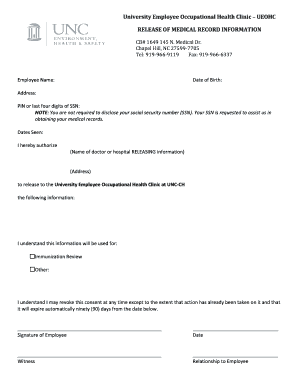
Get Unc Ueohc Release Of Medical Record Information 2015-2025
How it works
-

Open form follow the instructions
-

Easily sign the form with your finger
-

Send filled & signed form or save
How to fill out the UNC UEOHC Release Of Medical Record Information online
Completing the UNC UEOHC Release Of Medical Record Information form is essential for allowing the University Employee Occupational Health Clinic to access your medical records. This guide provides clear instructions to help you fill out the form accurately and efficiently.
Follow the steps to complete the form with ease.
- Press the ‘Get Form’ button to obtain the form and open it in the editor.
- Enter your full name in the 'Employee Name' field. Ensure that it matches the name on your official records for accurate processing.
- Input your date of birth in the 'Date of Birth' field. This helps in verifying your identity.
- Fill in your current address in the designated 'Address' field. Providing an accurate address is important for any necessary follow-up communication.
- In the 'PIN or last four digits of SSN' field, you may enter your PIN or the last four digits of your social security number. Note that disclosing your entire SSN is not required, but it can assist in locating your records.
- Specify the 'Dates Seen' by listing the relevant time periods for the medical services you are authorizing access to.
- In the section where it asks for the releasing party's information, input the name of the doctor or hospital that possesses your medical records in the 'Name of doctor or hospital RELEASING information' field.
- Provide the address of the doctor or hospital in the '(Address)' field to ensure the correct location is referenced.
- Indicate the purpose for which this information will be used by checking the appropriate box. Options typically include 'Immunization Review' or 'Other.' If you check 'Other,' please specify the purpose.
- Acknowledge your understanding of the consent by reading the statement provided on the form. Note that you can revoke this consent at any time. Review the expiration clause that states the consent will expire automatically 90 days from the date signed.
- Sign the form in the 'Signature of Employee' field to provide your authorization.
- Fill in the 'Date' field with the date when you are completing the form.
- If required, have a witness sign the form in the 'Witness' field and enter their relationship to you in the 'Relationship to Employee' field.
- After completing all fields and reviewing the form for accuracy, you can save changes, download, print, or share the completed form as needed.
Complete your documents online today for a seamless experience.
NOTE: Records must be retained 11 years after last encounter at hospital.
Industry-leading security and compliance
US Legal Forms protects your data by complying with industry-specific security standards.
-
In businnes since 199725+ years providing professional legal documents.
-
Accredited businessGuarantees that a business meets BBB accreditation standards in the US and Canada.
-
Secured by BraintreeValidated Level 1 PCI DSS compliant payment gateway that accepts most major credit and debit card brands from across the globe.