Loading
Get Ks Ar 50 2018-2026
How it works
-

Open form follow the instructions
-

Easily sign the form with your finger
-

Send filled & signed form or save
How to fill out the KS AR 50 online
The KS AR 50 is an important document for for-profit corporations in Kansas, serving as the annual report that ensures compliance with state regulations. This guide provides step-by-step instructions to help users complete the form accurately and efficiently online.
Follow the steps to complete your KS AR 50 online.
- Click 'Get Form' button to obtain the KS AR 50 and proceed to fill it out in your preferred editor.
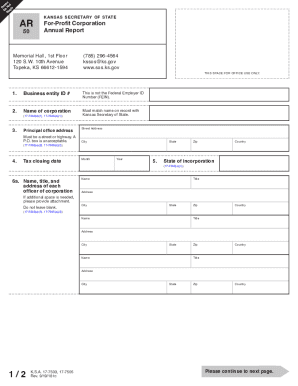
- Enter your business entity ID number in the first field. Make sure to note that this is different from the Federal Employer ID Number (FEIN).
- Fill in the name of your corporation exactly as it appears in the records of the Kansas Secretary of State.
- Provide the principal office address. Ensure that it is a street address, as P.O. boxes are not accepted.
- Include your tax closing date, ensuring it reflects the appropriate month, year, and state.
- List the names, titles, and addresses of each corporate officer. This section should not be left blank.
- If there are directors of the corporation who are different from the officers, list their names and addresses in the corresponding section.
- Provide your Federal Employer Identification Number (FEIN), if applicable, although this is not required.
- Enter the total number of shares of capital stock that have been issued by your corporation.
- Describe the nature and kind of business that your corporation engages in.
- Indicate if your corporation holds more than 50% equity ownership in any other business entities. Complete the subsequent questions if applicable.
- Answer whether your corporation owns or leases land in Kansas suitable for agricultural use. If yes, an additional attachment is needed.
- Provide a declaration under penalty of perjury at the end of the form by signing with the name of the authorized officer, their title, and phone number.
- Review the form to ensure all information is correct and complete before proceeding to save changes, download, or print the completed document for submission.
Complete your KS AR 50 online today to ensure compliance and avoid penalties!
All for-profit entities with a tax period other than a calendar year must file an annual report no later than the 15th day of the fourth month following the end of the entity's tax period. Not-for-profit entities with a calendar year tax period may file an annual report any time after the end of the tax period.