Loading
Get Sg Spgroup Reschedule Of Appointment 2021-2025
How it works
-

Open form follow the instructions
-

Easily sign the form with your finger
-

Send filled & signed form or save
How to fill out the SG SPgroup Reschedule Of Appointment online
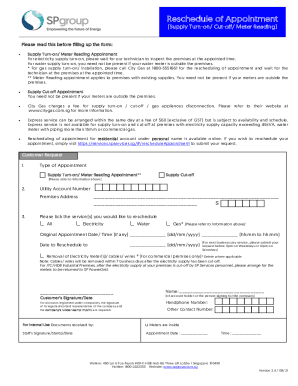
This guide provides clear, step-by-step instructions on how to complete the SG SPgroup Reschedule Of Appointment form online. Whether you are rescheduling a supply turn-on, cut-off, or meter reading appointment, this guide will help you navigate the process smoothly.
Follow the steps to effectively complete your rescheduling request.
- Press the ‘Get Form’ button to access the SG SPgroup Reschedule Of Appointment form and open it in your preferred editor.
- Select the type of appointment you wish to reschedule, such as 'Supply Turn-on/Meter Reading Appointment' or 'Supply Cut-off'.
- Input your utility account number and the premises address clearly in the designated fields.
- Tick the appropriate service(s) you would like to reschedule, choosing from options like 'Electricity', 'Water', or 'Gas'.
- If there is an original appointment date and time, fill in the fields provided with the correct information.
- Enter the new date you wish to reschedule your appointment to, ensuring it complies with the submission timelines mentioned.
- If applicable, indicate if you require the removal of electricity meter(s), cables, or wires, especially if this is a commercial premises request.
- Sign and date the form in the specified area; if the account is under a company, ensure the legal representative signs and includes the rubber stamp.
- Complete any remaining details such as handphone number and other contact numbers if necessary.
- Once all fields are completed, review your entries for accuracy, save your changes, and then you may choose to download, print, or share the form.
Complete your SG SPgroup Reschedule Of Appointment form online today.
To open an account, you may call the SP Services hotline at 1800 222 2333 or visit the SP Services Customer Service Centre at Toa Payoh HDB Hub.
Industry-leading security and compliance
US Legal Forms protects your data by complying with industry-specific security standards.
-
In businnes since 199725+ years providing professional legal documents.
-
Accredited businessGuarantees that a business meets BBB accreditation standards in the US and Canada.
-
Secured by BraintreeValidated Level 1 PCI DSS compliant payment gateway that accepts most major credit and debit card brands from across the globe.