Loading
Get Get The Free Approved Inspection Station Scheme Change ...
How it works
-

Open form follow the instructions
-

Easily sign the form with your finger
-

Send filled & signed form or save
How to fill out the Get The Free Approved Inspection Station Scheme Change online
This guide provides a step-by-step approach to filling out the Get The Free Approved Inspection Station Scheme Change form online. Whether you are making changes to your inspection station or replacing your approval, this guide will assist you through the process in a clear and supportive manner.
Follow the steps to successfully complete your application.
- Press the ‘Get Form’ button to access the form and open it in your preferred editor.
- Enter your Approved Inspection Station (AIS) number in the designated field at the top of the form.
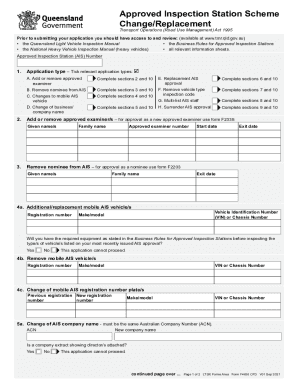
- Indicate the application type by ticking the appropriate options that apply to your situation. This may include adding or removing approved examiners or changing the nominee from your AIS, as well as other relevant options.
- Complete the necessary sections based on your selected application type. Ensure to fill sections 2 and 10 for adding or removing an examiner, sections 3 and 10 for removing a nominee, and so forth based on the instructions provided next to each application type.
- If adding or changing a mobile AIS vehicle, fill in the vehicle's registration number, VIN or chassis number, and make/model as required in the respective sections.
- For a change of company or business name, provide the new name and the Australian Company Number (ACN). Ensure you attach any required documentation, such as a company extract showing directors.
- In the case of requesting a replacement AIS approval, tick the relevant box if the approval was lost, stolen, or destroyed.
- Review and confirm that all signatures are included at the Declaration and Consent section, authorizing necessary checks by the Department of Transport and Main Roads.
- Finally, save your changes, and if required, download or print the completed form. You can also share it via email or upload it through the relevant channels.
Complete your application online today for a streamlined inspection station change process.
Related links form
To apply for accreditation as an approved examiner, you will need to: • complete Approved Examiner Application (F2339) • pay the fee for the Approved Examiner Application at (refer to the AIS fee schedule for the current fee amount). pay. • lodge your application at a transport and motoring service centre.