Loading
Get Wshfcamctax Credit Compliance Procedures Manual
How it works
-

Open form follow the instructions
-

Easily sign the form with your finger
-

Send filled & signed form or save
How to fill out the WSHFCAMCTax Credit Compliance Procedures Manual online
Completing the WSHFCAMCTax Credit Compliance Procedures Manual online is a straightforward process. This guide aims to provide clarity on each section of the form, ensuring that users, regardless of their prior experience, can successfully navigate and complete it efficiently.
Follow the steps to complete the form accurately.
- Click ‘Get Form’ button to obtain the form and open it in your document editor.
- Enter the effective date of the certification. Ensure that it is no later than one year from the previous certification's effective date.
- Input the most recent move-in date of the household, which signifies when the household last qualified for tax credits.
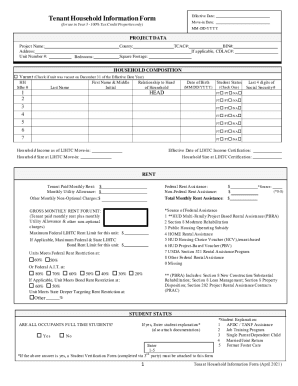
- Provide project data including the project name, address, unit number, county, number of bedrooms, TCAC number, BIN number, and square footage.
- In the household composition section, list all occupants of the unit. Specify each member's relationship to the head of household and provide relevant personal details such as date of birth and student status.
- Fill out the rent section with the tenant-paid monthly rent, monthly utility allowance, and any other applicable charges. Be sure to specify any federal or non-federal rent assistance received.
- Complete the household certification section. All members aged 18 and older must sign and date the form to verify the information provided.
- After reviewing all the entries for accuracy, you can save changes, download, print, or share the completed form.
Complete your documentation process online to ensure compliance and accuracy.
Use Form 4506 to: Request a copy of your tax return, or. Designate a third party to receive the tax return.