Loading
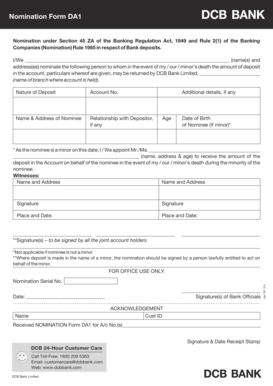
Get Nomination Form Da1 - Dcb Bank
How it works
-

Open form follow the instructions
-

Easily sign the form with your finger
-

Send filled & signed form or save
How to fill out the Nomination Form DA1 - DCB Bank online
Filling out the Nomination Form DA1 - DCB Bank online is a straightforward process that allows you to designate a nominee for your bank deposits. This guide will help you navigate each section of the form with ease and accuracy.
Follow the steps to complete your nomination form online.
- Press the ‘Get Form’ button to access the Nomination Form DA1 and ensure it opens for your review.
- Begin by filling in your name(s) and address(es) in the designated fields. Make sure all spelling is correct to avoid issues later.
- Next, specify the name of the branch where your account is held. This is important for the bank to process your nomination.
- Indicate the nature of the deposit and the corresponding account number associated with it.
- Provide the name and address of the nominee clearly. Ensure the nominee's details are accurate and complete.
- If applicable, state your relationship with the nominee. This helps the bank verify the connection and process the nomination correctly.
- For minor nominees, include additional details such as age and date of birth. If the nominee is a minor, appoint an adult to manage the deposit on their behalf.
- Add names and addresses of witnesses as required. Their signatures will be necessary for validation of the nomination.
- Finally, sign the form along with all joint account holders, if necessary. Confirm that the place and date are accurately mentioned.
- Once you have completed all sections, you can save the changes, download, print, or share the completed form as needed.
Complete your Nomination Form DA1 online today to ensure your deposits are appropriately managed.
Here's how it works Draw your signature, type it, upload its image, or use your mobile device as a signature pad. Send sbi nomination form da1 via email, link, or fax. You can also download it, export it or print it out. Type text, add images, blackout confidential details, add comments, highlights and more.