Loading
Get Copy / Research Request - Las Vegas Justice Court
How it works
-

Open form follow the instructions
-

Easily sign the form with your finger
-

Send filled & signed form or save
How to fill out the Copy / Research Request - Las Vegas Justice Court online
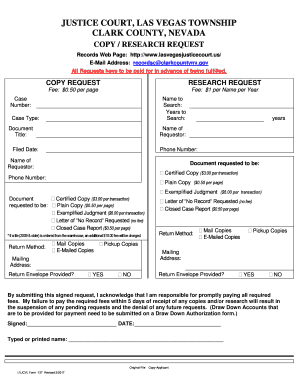
The Copy / Research Request form for the Las Vegas Justice Court allows users to formally request copies of court documents or conduct research on specific cases. This guide provides a step-by-step approach to easily navigate and complete the form online.
Follow the steps to fill out the form accurately and efficiently.
- Press the ‘Get Form’ button to access the Copy / Research Request form. This will open the form in the designated editing tool.
- Begin by entering your case number in the designated field to ensure your request is associated with the correct case.
- Fill in the name to search for in the provided section, making sure to be as accurate as possible to facilitate the search.
- Indicate the years you want to search in the 'Years to Search' section to narrow down the records relevant to your request.
- Select the case type from the available options to specify the nature of the case you are inquiring about.
- Provide the title of the document you are requesting by filling out the Document Title section.
- Enter your name in the 'Name of Requestor' field to identify who is making the request.
- Fill in the 'Filed Date' and your phone number to ensure the court can reach you if needed.
- Choose the type of document you would like (Certified Copy, Plain Copy, Exemplified Judgment, etc.) and indicate the necessary fees associated with each type.
- Select how you would like to receive your copies — via mail, pickup, or email. Enter your mailing address if you choose to receive copies by mail.
- Indicate whether you are providing a return envelope for your documents by selecting ‘YES’ or ‘NO’.
- Review all entered information to ensure accuracy before submitting. Sign and date the request to acknowledge that you understand your responsibilities regarding payment.
- After completing the form, you can save your changes, download a copy, print it, or share it as needed.
Complete your Copy / Research Request online for efficient access to court documents.
Case Information: Access most current case information online click here. For any case related questions or information please contact the Court at (702) 671-3116 or 1-877-455-1289 Toll Free.