Loading
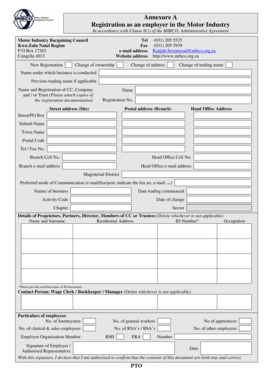
Get Annexure A Registration As An Employer In The Motor Industry - Mibco Org
How it works
-

Open form follow the instructions
-

Easily sign the form with your finger
-

Send filled & signed form or save
How to fill out the Annexure A Registration As An Employer In The Motor Industry - Mibco Org online
Filling out the Annexure A Registration as an Employer in the Motor Industry is an essential step for businesses operating in the sector. This guide provides clear instructions to assist users in completing the form accurately and efficiently online.
Follow the steps to complete the form online successfully.
- Click ‘Get Form’ button to access the form and open it in the editor.
- Begin by indicating whether this is a new registration or if you are reporting a change of ownership, address, or trading name. Make sure to select the appropriate option.
- Enter the name under which the business is conducted, including any previous trading names if applicable. Additionally, provide the name and registration details of your CC, company, or trust, and attach copies of the registration documentation.
- Fill in the street address for your business site as well as the postal address. Include details for the head office, such as street/PO Box, suburb name, town name, and postal code.
- Provide contact information including telephone and fax numbers, and the email address of both the branch and head office.
- Specify the magisterial district pertaining to your business and select your preferred mode of communication. Indicate if you prefer email, fax, or post and provide relevant contact details.
- Describe the nature of your business and indicate the date trading commenced, along with the activity code relevant to your operations.
- Detail any changes, including the date of the change, chapter, and sector associated with your registration.
- List the details of proprietors, partners, directors, or trustees as applicable, including their name, surname, residential address, ID number, and occupation. Note that certified copies of ID documents must be provided.
- Identify a contact person, such as a wage clerk or bookkeeper, and provide their details.
- Provide particulars of employees, including numbers for journeymen, general workers, apprentices, clerical and sales employees, RSA’s/BSA’s, and any other employees.
- Indicate membership to any employer organization such as RMI or FRA, and provide their corresponding numbers where applicable.
- Finally, sign the document and date it, confirming that you are authorized to declare the contents are true and correct.
- Once completed, you can save the changes, download a copy, print the document, or share it as necessary.
Complete your registration process online by following these steps today.
Once such power being that a bargaining council is entitled to establish and administer pension, provident, medical aid, sick pay, funds, or any similar schemes or funds for the benefit of one or more of the parties to the bargaining council or their members.
Industry-leading security and compliance
US Legal Forms protects your data by complying with industry-specific security standards.
-
In businnes since 199725+ years providing professional legal documents.
-
Accredited businessGuarantees that a business meets BBB accreditation standards in the US and Canada.
-
Secured by BraintreeValidated Level 1 PCI DSS compliant payment gateway that accepts most major credit and debit card brands from across the globe.