Loading
Get Children's Medical History Form
How it works
-

Open form follow the instructions
-

Easily sign the form with your finger
-

Send filled & signed form or save
How to fill out the Children's Medical History Form online
Completing the Children's Medical History Form online is an essential step in ensuring your child's health needs are accurately recorded. This guide will provide you with clear, step-by-step instructions to navigate the form efficiently.
Follow the steps to complete the Children's Medical History Form accurately.
- Click ‘Get Form’ button to obtain the form and open it in the editor.
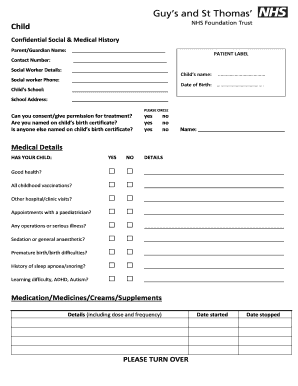
- Begin by filling out the parent or guardian name and contact number at the top of the form. It's crucial to provide accurate details to ensure effective communication regarding your child’s healthcare.
- Next, enter the social worker details if applicable. Include their name and contact number to facilitate coordination between healthcare providers.
- Provide the child's school name and address. This information is important for school-related health services.
- Fill in the child's name and date of birth in the designated areas. This helps clarify the records and ensures that the form pertains to the correct individual.
- In the consent section, indicate whether you can give permission for treatment and if you are named on the child's birth certificate. Circle 'yes' or 'no' as appropriate.
- Proceed to the medical details section. For each question regarding your child's health, mark 'yes' or 'no' accordingly. Be sure to provide additional details in the provided space if you answer 'yes' to any health question.
- In the medications section, list any medications, creams, or supplements your child is currently taking, along with the dosage and frequency. Also, note the start and stop dates as necessary.
- For each potential health issue listed, indicate 'yes' or 'no' and provide relevant details if applicable. This includes a wide range of conditions—be thorough to ensure comprehensive health records.
- For older children, answer the additional questions relating to tobacco use, alcohol, or drug use, and potential pregnancy. This information is vital for their healthcare provider to make informed decisions.
- Finally, ensure that the form is checked and signed by a dentist or doctor if required. Print their name and date to confirm the completion of the form.
- After completing all sections, you may choose to save your changes, download, print, or share the form as required to submit it to the relevant healthcare providers.
Begin completing the Children's Medical History Form online today to ensure your child's health information is accurately recorded.
Legal information such as narratives provided to your professional liability carrier or correspondence with your defense attorney, Unprofessional or personal comments about the patient, or. Derogatory comments about colleagues or their treatment of the patient.