Loading
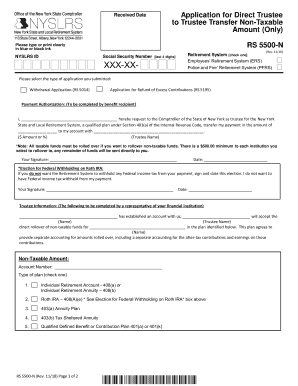
Get Application For Direct Trustee To Trustee Transfer Non-taxable Amount (only) (rs5500-n). To Request
How it works
-

Open form follow the instructions
-

Easily sign the form with your finger
-

Send filled & signed form or save
How to use or fill out the Application For Direct Trustee To Trustee Transfer Non-Taxable Amount (Only) (RS5500-N). To Request online
Filling out the Application For Direct Trustee To Trustee Transfer Non-Taxable Amount (Only) (RS5500-N) is an essential step for users looking to transfer non-taxable retirement funds to another trustee. This guide provides clear instructions to help you complete the form accurately and efficiently, ensuring a smooth online transfer process.
Follow the steps to complete the application smoothly.
- Click ‘Get Form’ button to obtain the form and open it in the editor.
- Fill in the received date at the top of the form. This date should reflect when you are submitting your application.
- Enter your NYSLRS ID and the last four digits of your Social Security Number in the relevant fields. This information is essential for identification purposes.
- Select your Retirement System by checking either the Employees’ Retirement System (ERS) or the Police and Fire Retirement System (PFRS). This choice is important as it determines the system from which you are transferring funds.
- Indicate the type of application you are submitting by selecting one of the available options: Withdrawal Application (RS 5014) or Application for Refund of Excess Contributions (RS 5195). Ensure you choose the correct application type.
- In the Payment Authorization section, clearly write the amount you wish to transfer and the name of the trustee to which the funds will be sent. It’s important to enter the dollar amount or percentage you want transferred.
- Sign and date the application as the benefit recipient to authorize the transfer. If you prefer not to have Federal income tax withheld from your payment, indicate this by signing and dating the relevant election box.
- The Trustee Information section must be completed by a representative of your financial institution. They will provide their name and details regarding your new account and agreement for handling non-taxable funds.
- Complete the section for the Non-Taxable Amount, including the account number and type of plan. Ensure you select the correct type of retirement account from the provided options.
- Finalize by obtaining the trustee/custodian's signature, printed name, and the date of signing. This confirmation is necessary for processing the transfer.
- Return the entire completed document to the New York State and Local Retirement System at the specified address.
Start completing your Application For Direct Trustee To Trustee Transfer Non-Taxable Amount (Only) (RS5500-N) online now!
Beginning at age 62, your pension will be reduced by one-half (50 percent) of the primary Social Security benefit — regardless of whether you are actually collecting a benefit from Social Security.
Industry-leading security and compliance
US Legal Forms protects your data by complying with industry-specific security standards.
-
In businnes since 199725+ years providing professional legal documents.
-
Accredited businessGuarantees that a business meets BBB accreditation standards in the US and Canada.
-
Secured by BraintreeValidated Level 1 PCI DSS compliant payment gateway that accepts most major credit and debit card brands from across the globe.