Loading
Get Elegant Memo - New Mexico Department Of Workforce Solutions - Dws State Nm
How it works
-

Open form follow the instructions
-

Easily sign the form with your finger
-

Send filled & signed form or save
How to fill out the Elegant Memo - New Mexico Department of Workforce Solutions - Dws State Nm online
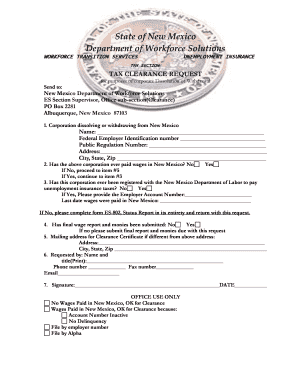
Filling out the Elegant Memo for the New Mexico Department of Workforce Solutions is a straightforward process. This guide provides step-by-step instructions to help you complete the tax clearance request form accurately and efficiently.
Follow the steps to complete your tax clearance request form.
- Click ‘Get Form’ button to access the tax clearance request form and open it for editing.
- In the first section, enter the name of the corporation that is dissolving or withdrawing from New Mexico. You will also need to provide the federal employer identification number, public regulation number, and the address, including city, state, and zip code.
- Indicate whether the corporation has ever paid wages in New Mexico by selecting 'Yes' or 'No.' If the answer is 'No,' you will proceed directly to item #5.
- If you answered 'Yes' to the previous question, continue to item #3 to determine if the corporation was ever registered with the New Mexico Department of Labor to pay unemployment insurance taxes. Provide the employer account number and the last date wages were paid in New Mexico.
- In item #4, confirm whether the final wage report and any owed taxes have been submitted. If not, you must submit these documents along with your clearance request.
- If you need a clearance certificate to be mailed to an address different from the initial one, complete the mailing address section provided.
- In the requested by section, fill in your name and title, along with your phone number, fax number, and email address.
- Finally, sign and date the form to certify that the information provided is accurate. Once all sections are complete, you have the option to save your changes, download the form, print it, or share it as needed.
Complete your tax clearance request form online today to ensure a seamless process.
You can file your new (initial) UI claim online at .jobs.state.nm.us. You can also file over the phone by calling 1-877-NM-4-MYUI(1-877-664-6984). After following the automated prompts, your call will be transferred to a Customer Service Agent (CSA) who will complete your claim.
Industry-leading security and compliance
US Legal Forms protects your data by complying with industry-specific security standards.
-
In businnes since 199725+ years providing professional legal documents.
-
Accredited businessGuarantees that a business meets BBB accreditation standards in the US and Canada.
-
Secured by BraintreeValidated Level 1 PCI DSS compliant payment gateway that accepts most major credit and debit card brands from across the globe.