Loading
Get Transcript Formcontinuing - Bits-goa Ac
How it works
-

Open form follow the instructions
-

Easily sign the form with your finger
-

Send filled & signed form or save
How to use or fill out the Transcript FormContinuing - Bits-goa Ac online
This guide provides a clear and supportive walkthrough for completing the Transcript FormContinuing - Bits-goa Ac online. Following these steps will help ensure that all necessary information is accurately provided, making the submission process easy and efficient.
Follow the steps to successfully complete the form.
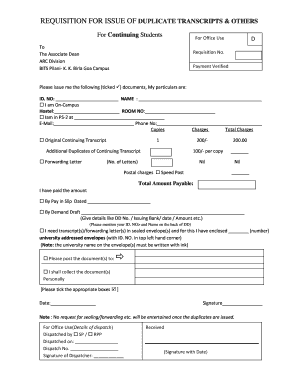
- Press the ‘Get Form’ button to retrieve the Transcript FormContinuing - Bits-goa Ac and open it in your preferred interface.
- Fill in your ID number and name in the designated fields. This information is critical for identification in the records.
- Indicate your residential status by selecting the appropriate option. If you are on-campus, provide your hostel and room number. If you are in PS-2, mention the corresponding details.
- Provide your email address and phone number for communication regarding your request.
- In the document request section, tick the box next to the documents you are requesting (e.g., Original Continuing Transcript, Forwarding Letter), including the number of copies if applicable.
- Calculate the total charges based on your requests. Ensure that the total amount payable is accurate.
- Confirm your payment method by filling in the relevant details for either a Pay in Slip or Demand Draft, including the date and amount.
- If requiring transcripts in sealed envelopes, write the number of addressed envelopes enclosed. Ensure your ID number is written on the top left corner of each envelope.
- Specify whether you would like the documents to be posted or if you will collect them in person by ticking the appropriate box.
- Finally, date the application, sign it, and review all provided information for completeness before saving the form.
- Once all steps are completed, you can save your changes, download a copy of the form, print it out, or share it as needed.
Complete your Transcript FormContinuing - Bits-goa Ac online today and ensure all your documentation is in order.
It is tier 1 i.e., in the league of colleges like top NITs, mid IITs & BITS Goa. See mate, how I see it is. BITS Pilani (all campuses) are tier 1.