Loading
Get Interactive Brokers Ira Rollover Form
How it works
-

Open form follow the instructions
-

Easily sign the form with your finger
-

Send filled & signed form or save
How to fill out the Interactive Brokers IRA Rollover Form online
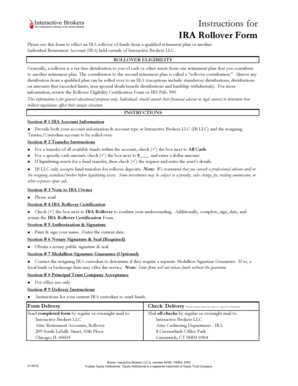
Filling out the Interactive Brokers IRA Rollover Form online can be a straightforward process if you navigate through each section methodically. This guide will provide you with step-by-step instructions to ensure you accurately complete the form and facilitate your rollover.
Follow the steps to complete your rollover form successfully.
- Click ‘Get Form’ button to obtain the form and open it in the editor.
- In Section # 1, provide your Interactive Brokers account information, including your IB account number and account type, as well as the details of the resigning trustee or custodian's account.
- Under Section # 2, select your transfer instructions. If you wish to transfer all available funds, check the box next to 'All Cash'. For a specific amount, check the box next to '$____' and specify the dollar amount.
- If you need to liquidate assets for a fund transfer, check the necessary box and include the details of the assets you wish to liquidate.
- In Section # 3, take a moment to read the note directed to the IRA owner carefully.
- Proceed to Section # 4 and check the box confirming your understanding of the IRA rollover requirements. Complete, sign, and date the IRA Rollover Certification Form as instructed.
- In Section # 5, provide your authorization by printing your name, signing, and entering the current date to validate your request.
- Section # 6 requires a notary public signature and seal to confirm the authenticity of your signature.
- Consult with the resigning IRA custodian regarding the need for a Medallion Signature Guarantee as mentioned in Section # 7. This may be necessary for some transfers.
- Section # 8 is for office use only, typically not requiring input from you.
- In Section # 9, ensure you provide delivery instructions for your current IRA custodian to send funds appropriately.
- Finally, review all your entries before saving changes, downloading, printing, or sharing the form.
Start your rollover process by filling out the Interactive Brokers IRA Rollover Form online today.
Direct Rollover: A transfer of a qualified plan type between different plan types (i.e., 401(k) to IRA, TSA to IRA). An IRS Form 5498 will be generated for an incoming rollover. An IRS Form 1099-R will be generated for the distribution.