Loading
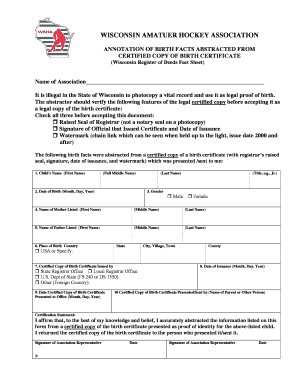
Get Birth Record Waha
How it works
-

Open form follow the instructions
-

Easily sign the form with your finger
-

Send filled & signed form or save
How to fill out the Birth Record WAHA online
Completing the Birth Record WAHA form online is a crucial step for various processes involving the identification of a child. This guide offers a clear and concise walkthrough to help users accurately fill out the form and ensure compliance with all necessary requirements.
Follow the steps to successfully complete the form.
- Press the ‘Get Form’ button to acquire the Birth Record WAHA form and open it for editing.
- Begin by entering the name of the association in the provided field at the top of the form.
- Verify the certified copy of the birth certificate by checking essential features such as the raised seal of the registrar, the signature of the official who issued the certificate, and the watermark visible when held to the light.
- Fill out the child’s name, including first name, full middle name, last name, and any titles (e.g., Jr.).
- Enter the date of birth by specifying the month, day, and year.
- Indicate the child’s gender by selecting either 'Male' or 'Female.'
- Input the mother’s full name as listed on the birth certificate, including first name, middle name, and last name.
- Input the father’s full name in the same format as the mother’s name.
- Specify the place of birth by selecting the country, state, and city, village, or town.
- Designate the office that issued the certified copy of the birth certificate, using options such as the State Registrar Office, Local Registrar Office, or U.S. Dept of State.
- Document the date the certified copy of the birth certificate was presented to the office.
- Record the date of issuance of the certified copy.
- Enter the name of the parent or other person who presented or sent the certified copy of the birth certificate.
- Complete the certification statement by affirming the accuracy of the information abstracted from the birth certificate and signing as the association representative.
- Save all changes made to the form, and you may choose to download, print, or share the document as needed.
Complete your documents online today to ensure a smooth submission process.