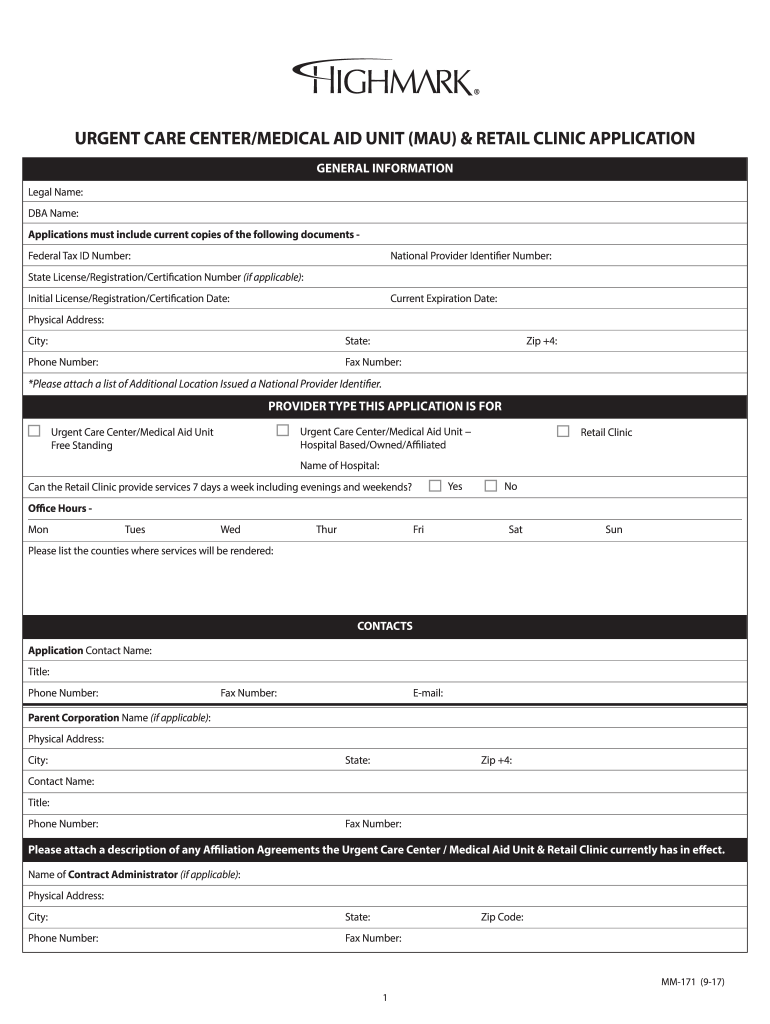
URGENT CARE CENTER/MEDICAL AID UNIT (MAU) & RETAIL CLINIC APPLICATION GENERAL INFORMATION Legal Name: DBA Name: Applications must include current copies of the following documents Federal Tax.
Loading

Open form follow the instructions

Easily sign the form with your finger

Send filled & signed form or save
How to fill out the Highmark MM-171 online
Filling out the Highmark MM-171 form online can be a straightforward process if you follow the right steps. This guide will provide you with clear instructions to ensure you complete the form accurately and efficiently.
Follow the steps to successfully complete the Highmark MM-171 online
- Click ‘Get Form’ button to obtain the form and open it in the editor.
- Begin by entering the general information in the specified fields. Make sure to fill out your legal name, doing business as (DBA) name, and include your Federal Tax ID number, National Provider Identifier number, and State License/Registration/Certification number if applicable.
- Continue by filling in the physical address information, including street address, city, state, and zip code. Be sure to also include a valid phone number and fax number.
- In the provider type section, select the correct type of application by checking the appropriate box for either an Urgent Care Center/Medical Aid Unit or a Retail Clinic. Specify whether the clinic is hospital-based, free-standing, or affiliated.
- Indicate the operating hours for each day of the week and specify whether services will be provided seven days a week, including evenings and weekends.
- Complete the contacts section by filling in the application contact name, title, and contact information. Provide details for any parent corporation if applicable.
- Provide the electronic connectivity contact information by filling in the required details, including the EFT contact name and email address. Also, indicate your accreditation status with the relevant accrediting bodies.
- Attach any required documentation, including accreditation letters, licenses, and the Highmark Provider Form. Ensure all attachments are included before submission.
- Finally, review all filled sections to ensure accuracy. After confirming all information is correct, save changes, and download or print a copy of your completed application.
- Once everything is in order, fax the completed application and all documents to Provider Information Management at the number provided on the form.
Start filling out your Highmark MM-171 online today to ensure your application is submitted correctly and promptly.
Experience a faster way to fill out and sign forms on the web. Access the most extensive library of templates available.
Related content
Mar 1, 2015 — Spinneybeck Leather and Highmark Fabrics. 148-149. Custom Plastic Color...
The three-game total Is a pretty high mark, and In all probability will stand to the...
than 0.12 in/3 mm, there is a great danger of ... Do not exceed the high mark of the dip...
Use professional pre-built templates to fill in and sign documents online faster. Get access to thousands of forms.
If you believe that this page should be taken down, please follow our DMCA take down process here.