Loading
Get Au 8837789 2021-2026
How it works
-

Open form follow the instructions
-

Easily sign the form with your finger
-

Send filled & signed form or save
How to fill out the AU 8837789 online
Filling out the AU 8837789 form online can seem daunting, but with clear guidance, you can complete it efficiently. This guide will walk you through each section of the form, ensuring you understand exactly what information is required.
Follow the steps to effectively complete the AU 8837789 form.
- Press the ‘Get Form’ button to access the AU 8837789 form. This will allow you to open and begin editing the document.
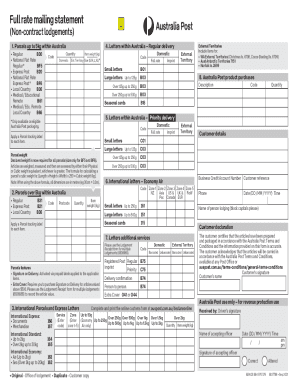
- Start filling in the details required for parcels up to 5kg within Australia. Indicate the type of service you are using by selecting the appropriate code from the options provided, such as Regular or Express Post.
- For letters within Australia, specify the quantity and weight of the items. Use the designated codes for small and large letters, ensuring accuracy in weight specifications.
- When listing items for external territories, provide the relevant postage codes and quantities for areas like Western Australia External Territories and Norfolk Island.
- In the Australia Post product purchases section, indicate the quantity of items you are sending and ensure you apply a parcel tracking label to each item by checking the respective box.
- Provide customer details, including your business credit account number and a customer reference, if applicable. Fill in the name of the person lodging the form in block capitals.
- Read the customer declaration carefully, ensuring you confirm your understanding of Australia Post Terms and Conditions. Sign the form as required.
- Finally, after reviewing all entries for accuracy, save your changes. You can then download, print, or share the completed AU 8837789 form as needed.
Complete your document online to ensure timely and accurate submission!