We use cookies to improve security, personalize the user experience, enhance our marketing activities (including cooperating with our marketing partners) and for other business use.
Click "here" to read our Cookie Policy. By clicking "Accept" you agree to the use of cookies. Read less
Read more
Accept
Loading
Form preview
  • US Legal Forms
  • Form Library
  • Labor Forms
  • Tennessee Labor Forms
  • Tn Lb-0910 2012

Get Tn Lb-0910 2012

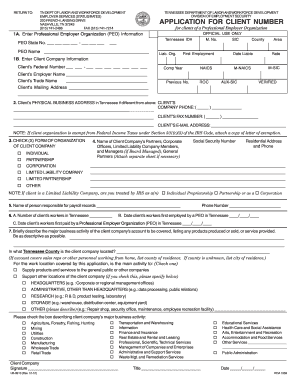
OR AND WORKFORCE DEVELOPMENT DIVISION OF EMPLOYMENT SECURITY APPLICATION FOR CLIENT NUMBER for clients of a Professional Employer Organization OFFICIAL USE ONLY M. No. SIC 1A. Enter Professional Employer Organization (PEO) Information PEO State No. ___ ___ ___ ___ - ___ ___ ___ Tennessee ID# ___ PEO Name _________________________________________ Liab. Org. First Employment County Area Date Liable Rate 1B. Enter Client Company Information Client’s Federal Number ___ ___ - ___ ___ __.

How it works

  1. Open form

    Open form follow the instructions

  2. Easily sign form

    Easily sign the form with your finger

  3. Share form

    Send filled & signed form or save

How to fill out the TN LB-0910 online

The TN LB-0910 form is an essential document for clients of Professional Employer Organizations (PEOs) to obtain a client number. This guide provides clear and supportive instructions on how to accurately complete the form online, ensuring a smooth submission process.

Follow the steps to complete the form effectively.

  1. Click 'Get Form' button to access the TN LB-0910 and open it in your editor.
  2. In section 1A, enter the Professional Employer Organization (PEO) information. Fill in the PEO State Number and Tennessee ID Number, followed by the name of the PEO, along with relevant liability organization details, the first employment date, the county, and the tax rate.
  3. Proceed to section 1B to provide the client company information. Enter the client’s Federal Number, employer name, trade name, and mailing address. Additionally, fill out the compensation year and any other associated codes.
  4. If the client's physical business address differs from the mailing address, input the physical address in section 2. Include the company phone, fax number, and email address. Remember to attach a letter of exemption if applicable.
  5. In section 3, check the appropriate box to indicate the form of organization (e.g., corporation, partnership, limited liability company).
  6. In section 4, list the names, social security numbers, and residential addresses of key individuals such as partners, officers, or members of the client company. Ensure this information is recorded accurately.
  7. Complete section 6 by entering the number of workers in Tennessee and the relevant dates for when the client’s workers were first employed and paid by the PEO.
  8. In section 7, provide a brief description of the major business activity of the client company, detailing products or services offered. Specify the county where the client company is located.
  9. Select the main activity covered by the application and check the box that best describes the client company’s major business activity from the provided list.
  10. Finally, ensure all sections are completed, print the form if necessary, and save your changes. You can also download or share the completed document for your records.

Complete the TN LB-0910 form online today for efficient processing!

Get form

Experience a faster way to fill out and sign forms on the web. Access the most extensive library of templates available.

Related content

Report to Determine Status (Employer Number)
STOP. Please complete LB-0910, Application for Client Number. NOTE:If corporation is a...
Learn more
Tenn. Comp. R. & Regs. 0400-12-01-.06 | State...
The purpose of this rule is to establish standards which define the acceptable management...
Learn more
TH-M508 TH-M303
CAUTION — F button! (XV-THM508/XV-THM303). Disconnect the mains plug to shut the power...
Learn more

Related links form

Chp Vehicle Inspection Checklist Service Report For Medical Equipments DCAP Receipt Form - 2006.doc Idfc Mutual Fund Bank Change Form

Questions & Answers

Get answers to your most pressing questions about US Legal Forms API.

Contact support

An access code number is a unique identifier required to enter secure online systems, such as TNPAWS. This code allows you to access your account, manage your unemployment claims, and retrieve important notifications. Make sure to keep your TN LB-0910 code confidential to protect your personal information.

To file your TN sales tax return, first visit the official Tennessee Department of Revenue website. You can complete your return online using their easy-to-navigate system. Make sure to have your TN LB-0910 form ready, as this will guide you through the necessary steps and information required for accurate submission.

In Tennessee, various factors can disqualify you from receiving unemployment benefits. Common reasons include voluntarily leaving your job without good cause or being discharged for misconduct. It is crucial to understand these factors to ensure compliance with TN LB-0910 guidelines.

Registering as an employer in Tennessee involves visiting the Tennessee Department of Labor and Workforce Development's website. You will need to complete the employer registration form and provide necessary information regarding your business. This process will set you up for compliance with TN LB-0910 requirements.

Finding your Tennessee employer account number can be done easily by checking any previous correspondence from the Tennessee Department of Labor. Alternatively, you can access your account online if you have registered. Keep your TN LB-0910 information handy to assist in this process.

To acquire an employer tax ID number, you must apply through the Internal Revenue Service (IRS). You can complete the application online for a quicker process. Remember, this number is vital for reporting your business taxes and fulfilling your obligations associated with TN LB-0910.

The TNpaws access code is crucial for managing your employer account online. You can get this code by registering at the designated TNpaws portal on the Tennessee Department of Labor's website. Ensure you have all necessary information ready, including your TN LB-0910 details, to streamline the process.

To obtain a TN employer account number, you need to register with the Tennessee Department of Labor and Workforce Development. Start by visiting their website and completing the required form for employer registration. Once submitted, you will receive your account number, which you will use for various reporting tasks relating to TN LB-0910.

Your College Board access code is generally mailed to you upon registration or can be found in your College Board account. Make sure to keep this information secure as it grants access to important academic records and services. For broader assistance with educational queries, including those relevant to TN LB-0910, USLegalForms is available to help you navigate these processes.

To find your Gmetrix access code, check the account settings on the Gmetrix dashboard or refer to the initial setup email you received. This code is crucial for accessing practice tests and other resources. If you need further direction related to education and resources, consider looking at USLegalForms, especially with respect to TN LB-0910.

Get This Form Now!

Use professional pre-built templates to fill in and sign documents online faster. Get access to thousands of forms.
If you believe that this page should be taken down, please follow our DMCA take down processhere.

Industry-leading security and compliance

US Legal Forms protects your data by complying with industry-specific security standards.
  • In businnes since 1997
    25+ years providing professional legal documents.
  • Accredited business
    Guarantees that a business meets BBB accreditation standards in the US and Canada.
  • Secured by Braintree
    Validated Level 1 PCI DSS compliant payment gateway that accepts most major credit and debit card brands from across the globe.
Get TN LB-0910
Form Packages
Adoption
Bankruptcy
Contractors
Divorce
Home Sales
Employment
Identity Theft
Incorporation
Landlord Tenant
Living Trust
Name Change
Personal Planning
Small Business
Wills & Estates
Packages A-Z
Form Categories
Affidavits
Bankruptcy
Bill of Sale
Corporate - LLC
Divorce
Employment
Identity Theft
Internet Technology
Landlord Tenant
Living Wills
Name Change
Power of Attorney
Real Estate
Small Estates
Wills
All Forms
Forms A-Z
Form Library
Customer Service
Terms of Service
Privacy Notice
Legal Hub
Content Takedown Policy
Bug Bounty Program
About Us
Help Portal
Legal Resources
Blog
Affiliates
Contact Us
Delete My Account
Site Map
Industries
Forms in Spanish
Localized Forms
State-specific Forms
Forms Kit
Legal Guides
Real Estate Handbook
All Guides
Prepared for You
Notarize
Incorporation services
Our Customers
For Consumers
For Small Business
For Attorneys
Our Sites
US Legal Forms
USLegal
FormsPass
pdfFiller
signNow
airSlate WorkFlow
DocHub
Instapage
Social Media
Call us now toll free:
+1 833 426 79 33
As seen in:
  • USA Today logo picture
  • CBC News logo picture
  • LA Times logo picture
  • The Washington Post logo picture
  • AP logo picture
  • Forbes logo picture
© Copyright 1997-2025
airSlate Legal Forms, Inc.
3720 Flowood Dr, Flowood, Mississippi 39232
Form Packages
Adoption
Bankruptcy
Contractors
Divorce
Home Sales
Employment
Identity Theft
Incorporation
Landlord Tenant
Living Trust
Name Change
Personal Planning
Small Business
Wills & Estates
Packages A-Z
Form Categories
Affidavits
Bankruptcy
Bill of Sale
Corporate - LLC
Divorce
Employment
Identity Theft
Internet Technology
Landlord Tenant
Living Wills
Name Change
Power of Attorney
Real Estate
Small Estates
Wills
All Forms
Forms A-Z
Form Library
Customer Service
Terms of Service
Privacy Notice
Legal Hub
Content Takedown Policy
Bug Bounty Program
About Us
Help Portal
Legal Resources
Blog
Affiliates
Contact Us
Delete My Account
Site Map
Industries
Forms in Spanish
Localized Forms
State-specific Forms
Forms Kit
Legal Guides
Real Estate Handbook
All Guides
Prepared for You
Notarize
Incorporation services
Our Customers
For Consumers
For Small Business
For Attorneys
Our Sites
US Legal Forms
USLegal
FormsPass
pdfFiller
signNow
airSlate WorkFlow
DocHub
Instapage
Social Media
Call us now toll free:
+1 833 426 79 33
As seen in:
  • USA Today logo picture
  • CBC News logo picture
  • LA Times logo picture
  • The Washington Post logo picture
  • AP logo picture
  • Forbes logo picture
© Copyright 1997-2025
airSlate Legal Forms, Inc.
3720 Flowood Dr, Flowood, Mississippi 39232
TN LB-0910
This form is available in several versions.
Select the version you need from the drop-down list below.
2015 TN LB-0910
Select form
  • 2015 TN LB-0910
  • 2012 TN LB-0910
Select form