Loading
Form preview
  • US Legal Forms
  • Form Library
  • Labor Forms
  • Pennsylvania Labor Forms
  • Pa Psrs-1237 2012

Get Pa Psrs-1237 2012-2026

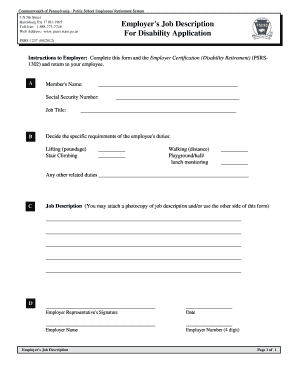
Rs.state.pa.us Employer's Job Description PSERS Health InsuranceApplication Program For Disability PSRS-1237 (08/2012) Instructions to Employer: Complete this form and the Employer Certification (Disability Retirement) (PSRS1302) and return to your employee. A Member's Name: ____________________________________________________ Social Security Number: Job Title: B ______________________________________________ __________________________________________________________ Decide the specif.

How it works

  1. Open form

    Open form follow the instructions

  2. Easily sign form

    Easily sign the form with your finger

  3. Share form

    Send filled & signed form or save

How to fill out the PA PSRS-1237 online

The PA PSRS-1237 form is essential for applying for disability retirement benefits through the Public School Employees' Retirement System in Pennsylvania. This guide will provide you with clear, step-by-step instructions on how to fill out this form online.

Follow the steps to complete the PA PSRS-1237 form online.

  1. Click the ‘Get Form’ button to access the PA PSRS-1237 form and open it in your preferred online editor.
  2. Begin by entering the member's name in section A, ensuring to provide the full name as it appears on official documents.
  3. Next, insert the member's Social Security Number and Job Title in section A. These details are crucial for identification purposes.
  4. In section B, assess and document the specific requirements of the employee's duties. Fill in the weight limits for lifting, details for stair climbing, distances for walking, and any monitoring responsibilities.
  5. If there are any other related duties, make sure to list them in the provided space. This will help in understanding the member’s job functions thoroughly.
  6. For section C, you may attach a photocopy of the job description or continue writing additional details about the job responsibilities on the reverse side of the form.
  7. Section D requires the signature of the employer representative. Please ensure a signature is provided along with the date and the employer's name.
  8. Lastly, input the employer number (4 digits) in section D before finalizing the form.
  9. Once all sections are filled out accurately, you can save the changes, download a copy, print the form, or share it as needed.

Complete your PA PSRS-1237 form online to facilitate your application for disability retirement benefits.

Get form

Experience a faster way to fill out and sign forms on the web. Access the most extensive library of templates available.
Get form

Related content

Applying for a PSERS Disability Retirement
□ Job Description (PSRS-1237) – You provide this form to your employer for completion...
Learn more
The drifting subpulse phenomenon observed in three...
by TH Hankins · 1987 · Cited by 57 — ... PSRs 1237+25 and 1857-26. For these two...
Learn more

Related links form

Kyc Self Declaration Filled Form National Merit Scholarship Application Form Pdf Mpcb Login E:Blue PagesBP Old1993JUNE93.FIN. Free Download: U.S. TREAS Form Treas-irs-8804-1993

Questions & Answers

Get answers to your most pressing questions about US Legal Forms API.

Contact support

Determining how much you will receive in retirement involves several key factors, including your years of service, final average salary, and the retirement multiplier. You can access your personalized retirement estimate through PSERS, which will provide you with an overview of your expected benefits. Utilize the resources available under PA PSRS-1237 to enhance your understanding and planning.

To request a retirement estimate from the Office of Personnel Management (OPM), you need to complete the appropriate forms available on their website. It’s important to include detailed information about your service history and any relevant employment details. Following the correct procedure ensures you receive a comprehensive estimate tailored to your situation related to PA PSRS-1237.

You can expect to receive a retirement estimate from PSERS in about four to six weeks after your request. This timeframe ensures that PSERS can accurately assess your years of service, salary history, and other factors that impact your benefits. For timely estimates and assistance, consider utilizing resources provided by PA PSRS-1237.

The Pennsylvania Public School Employees' Retirement System (PSERS) calculates the final average salary based on your highest three consecutive years of salary. Benefits are determined using this salary figure, which means that your teaching tenure and salary history are significant factors. To better understand how this affects your retirement under PA PSRS-1237, it’s beneficial to consult the specific guidelines from PSERS for clarity.

The retirement benefits for PA teachers vary, depending on multiple factors such as service years, salary, and the chosen retirement option under PSERS. Many teachers find their pensions to be a significant portion of their overall financial planning. As you evaluate your potential retirement income, refer to PA PSRS-1237 for comprehensive details that align with your retirement goals.

To request a retirement estimate from PSERS, you need to fill out a specific form which can be obtained from their website or by contacting their office directly. This estimate provides valuable insights into your future pension benefits based on your personal information. Using PA PSRS-1237 as a reference during this process ensures you receive tailored assistance for your retirement planning.

The PA teacher retirement multiplier is a critical factor in determining your retirement benefits under the PSERS system. Specifically, this multiplier is used to calculate the pension amount based on your years of service and the average of your highest earning years. Understanding this multiplier helps you estimate your retirement benefits accurately, particularly when looking into PA PSRS-1237.

The PA teacher pension multiplier is set at 2.5%, which calculates benefits for every year of service. This multiplier applies to teachers under the Public School Employees' Retirement System, impacting their retirement income significantly. Understanding this multiplier under the PA PSRS-1237 will help you plan accordingly for a secure financial future as you approach retirement.

The calculation of the Pennsylvania state pension involves several factors, including years of service, salary, and the specific multiplier set within the pension plan. Generally, pensions are calculated by multiplying years of service by the relevant percentage of the average salary. For members of the PA PSRS-1237, it’s important to grasp these calculations to anticipate your retirement benefits accurately.

For Pennsylvania teachers, the retirement multiplier is typically set at 2.5% for each year of service under the state's pension plan. This means that teachers can calculate their retirement benefits based on their years of teaching and average salary. For those engaged in the PA PSRS-1237, this multiplier plays a significant role in determining your overall retirement income.

Get This Form Now!

Use professional pre-built templates to fill in and sign documents online faster. Get access to thousands of forms.
Get form
If you believe that this page should be taken down, please follow our DMCA take down processhere.

Industry-leading security and compliance

US Legal Forms protects your data by complying with industry-specific security standards.
  • In businnes since 1997
    25+ years providing professional legal documents.
  • Accredited business
    Guarantees that a business meets BBB accreditation standards in the US and Canada.
  • Secured by Braintree
    Validated Level 1 PCI DSS compliant payment gateway that accepts most major credit and debit card brands from across the globe.
Get PA PSRS-1237
Get form
Form Packages
Adoption
Bankruptcy
Contractors
Divorce
Home Sales
Employment
Identity Theft
Incorporation
Landlord Tenant
Living Trust
Name Change
Personal Planning
Small Business
Wills & Estates
Packages A-Z
Form Categories
Affidavits
Bankruptcy
Bill of Sale
Corporate - LLC
Divorce
Employment
Identity Theft
Internet Technology
Landlord Tenant
Living Wills
Name Change
Power of Attorney
Real Estate
Small Estates
Wills
All Forms
Forms A-Z
Form Library
Customer Service
Your Privacy Choices
Terms of Service
Privacy Notice
Legal Hub
Content Takedown Policy
Bug Bounty Program
About Us
Help Portal
Legal Resources
Blog
Affiliates
Contact Us
Delete My Account
Site Map
Industries
Forms in Spanish
Localized Forms
State-specific Forms
Forms Kit
Legal Guides
Real Estate Handbook
All Guides
Prepared for You
Notarize
Incorporation services
Our Customers
For Consumers
For Small Business
For Attorneys
Our Sites
US Legal Forms
USLegal
FormsPass
pdfFiller
signNow
altaFlow
DocHub
Instapage
Social Media
Call us now toll free:
+1 833 426 79 33
As seen in:
  • USA Today logo picture
  • CBC News logo picture
  • LA Times logo picture
  • The Washington Post logo picture
  • AP logo picture
  • Forbes logo picture
© Copyright 1997-2026
airSlate Legal Forms, Inc.
3720 Flowood Dr, Flowood, Mississippi 39232
Form Packages
Adoption
Bankruptcy
Contractors
Divorce
Home Sales
Employment
Identity Theft
Incorporation
Landlord Tenant
Living Trust
Name Change
Personal Planning
Small Business
Wills & Estates
Packages A-Z
Form Categories
Affidavits
Bankruptcy
Bill of Sale
Corporate - LLC
Divorce
Employment
Identity Theft
Internet Technology
Landlord Tenant
Living Wills
Name Change
Power of Attorney
Real Estate
Small Estates
Wills
All Forms
Forms A-Z
Form Library
Customer Service
Your Privacy Choices
Terms of Service
Privacy Notice
Legal Hub
Content Takedown Policy
Bug Bounty Program
About Us
Help Portal
Legal Resources
Blog
Affiliates
Contact Us
Delete My Account
Site Map
Industries
Forms in Spanish
Localized Forms
State-specific Forms
Forms Kit
Legal Guides
Real Estate Handbook
All Guides
Prepared for You
Notarize
Incorporation services
Our Customers
For Consumers
For Small Business
For Attorneys
Our Sites
US Legal Forms
USLegal
FormsPass
pdfFiller
signNow
altaFlow
DocHub
Instapage
Social Media
Call us now toll free:
+1 833 426 79 33
As seen in:
  • USA Today logo picture
  • CBC News logo picture
  • LA Times logo picture
  • The Washington Post logo picture
  • AP logo picture
  • Forbes logo picture
© Copyright 1997-2026
airSlate Legal Forms, Inc.
3720 Flowood Dr, Flowood, Mississippi 39232