Loading
Get Record Of Service Letter
How it works
-

Open form follow the instructions
-

Easily sign the form with your finger
-

Send filled & signed form or save
How to fill out the Record Of Service Letter online
Filling out the Record Of Service Letter online can be straightforward when you understand each component of the form. This guide will provide you with clear instructions to help you complete the document accurately and efficiently.
Follow the steps to complete the Record Of Service Letter online.
- Click ‘Get Form’ button to access the form and open it in your document editing tool.
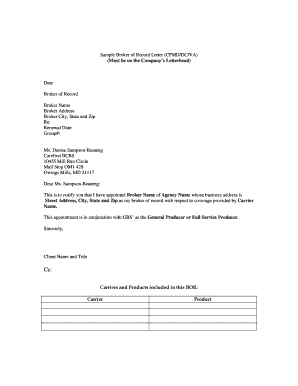
- Begin by entering the current date at the top of the form. This serves as an official record of when the letter was prepared.
- In the 'Broker of Record' section, input the name of the broker who will represent you. Ensure you accurately spell their full name.
- Fill in the broker's address, including the street address, city, state, and zip code. This information identifies where the broker can be contacted.
- In the 'Re:' section, indicate the relevant details of the service, such as the renewal date and group number, which are essential for record management.
- Address the letter to the appropriate individual, in this case, Ms. Denise Sampson-Boateng, ensuring the correct title and spelling are used.
- Compose the body of the letter to formally appoint the broker. Clearly state that you are appointing the designated broker as your broker of record regarding services from the specified carrier.
- Include the title and name of the client at the end of the letter. This lends authority to the document and confirms the identity of the person making the appointment.
- Be sure to add 'Cc:' followed by the names of the carriers and products included in the Broker of Record. List each carrier and product in individual lines for clarity.
- Finally, review all entered details for accuracy. Once confirmed, you can save changes, download, print, or share the completed form as needed.
Complete your Record Of Service Letter online today for streamlined document management.
10 ways to deliver great customer service Know your product. ... Maintain a positive attitude. ... Creatively problem-solve. ... Respond quickly. ... Personalize your service. ... Help customers help themselves. ... Focus support on the customer. ... Actively listen.
Industry-leading security and compliance
US Legal Forms protects your data by complying with industry-specific security standards.
-
In businnes since 199725+ years providing professional legal documents.
-
Accredited businessGuarantees that a business meets BBB accreditation standards in the US and Canada.
-
Secured by BraintreeValidated Level 1 PCI DSS compliant payment gateway that accepts most major credit and debit card brands from across the globe.