Loading
Get Vrmd
How it works
-

Open form follow the instructions
-

Easily sign the form with your finger
-

Send filled & signed form or save
How to fill out the Vrmd online
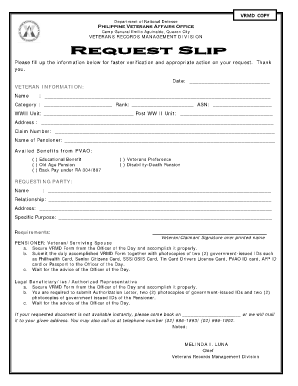
Filling out the Veterans Records Management Division (Vrmd) form is an essential step for veterans and authorized representatives seeking to access important benefits and records. This guide provides a comprehensive overview of the steps required to complete the Vrmd online effectively.
Follow the steps to accurately complete the Vrmd form.
- Click the 'Get Form' button to acquire the Vrmd form and open it in your preferred digital editor.
- Enter the date in the designated section at the top of the form.
- Provide veteran information including the full name, category, rank, ASN number, WWII unit, and post-WWII unit in the appropriate fields.
- Fill in the address of the veteran accurately.
- Input the claim number associated with the veteran.
- Specify the name of the pensioner in the provided space.
- Indicate the benefits availed from the Philippine Veterans Affairs Office by checking the relevant boxes.
- Complete the requesting party section by entering the name, relationship to the veteran, address, and specific purpose of the request.
- Ensure all required signatures are provided where indicated, including the signature of the veteran or claimant.
- Save your changes to the form, then download, print, or share the completed document as needed.
Complete the Vrmd form online today to efficiently manage your veteran's records and benefits.
