Loading
Get Mc 505, Contact Information
How it works
-

Open form follow the instructions
-

Easily sign the form with your finger
-

Send filled & signed form or save
How to fill out the MC 505, Contact Information online
Filling out the MC 505, Contact Information form is essential for ensuring that the court can reach you regarding your case. This guide provides step-by-step instructions to help you complete the form accurately and efficiently online.
Follow the steps to fill out the MC 505 form correctly.
- Press the ‘Get Form’ button to access the MC 505 form and open it in your document editor.
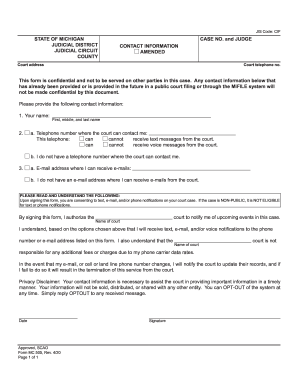
- Begin by entering your full name in the designated field, including your first, middle, and last name.
- Provide the telephone number where the court can contact you. Indicate whether this number can receive text messages and voice messages by selecting the appropriate options.
- If you do not have a telephone number, select the option indicating that you lack a contact number.
- Enter your email address in the provided field for communication purposes and select if you do not have an email address.
- Read carefully through the consent section before signing. This indicates that you agree to receive notifications regarding your court case.
- Date the form and provide your signature in the allocated space.
- Once you have filled out all sections, save your changes. You can also download, print, or share the form according to your needs.
Complete your MC 505, Contact Information form online today to ensure you receive important updates about your court case.